
Close Menu
The LinkxThe Linkx
  • Home
  • Technology
    • Gadgets
    • IoT
    • Mobile
    • Nanotechnology
    • Green Technology
  • Trending
  • Advertising
  • Social Media
    • Branding
    • Email Marketing
    • Video Marketing
  • Shop

Subscribe to Updates

Get the latest tech news from thelinkx.com about tech, gadgets and trendings.

Please enable JavaScript in your browser to complete this form.
Loading
What's Hot

Turning your Android phone into a mini Nintendo Switch just got easier

December 22, 2025

How companies can thrive amid sustainable packaging uncertainty

December 22, 2025

Sustainability trends for 2026: From boardroom decisions to real-world…

December 22, 2025
Facebook X (Twitter) Instagram
Facebook X (Twitter) Instagram Pinterest Vimeo
The LinkxThe Linkx
  • Home
  • Technology
    • Gadgets
    • IoT
    • Mobile
    • Nanotechnology
    • Green Technology
  • Trending
  • Advertising
  • Social Media
    • Branding
    • Email Marketing
    • Video Marketing
  • Shop
The LinkxThe Linkx
Home»Social Media»YouTube Provides Opt Out for Livestream Leaderboards
Social Media

YouTube Provides Opt Out for Livestream Leaderboards

Editor-In-ChiefBy Editor-In-ChiefOctober 29, 2025No Comments3 Mins Read
Share Facebook Twitter Pinterest LinkedIn Tumblr Reddit Telegram Email
YouTube Provides Opt Out for Livestream Leaderboards
Share
Facebook Twitter LinkedIn Pinterest Email


This audio is auto-generated. Please let us know if you have feedback.

After experimenting with its live-stream leaderboards to encourage viewer engagement over the past few months, YouTube is now adding more control options, so that creators can decide when these leaderboards are shown within their broadcasts.

Originally announced back in July, YouTube’s live leaderboards list the most engaged viewers within a broadcast, ranked by “XP,” which is a cumulative score based on how many comments, Super Chat, Super Stickers, and/or gifts that each viewer has submitted during a stream.
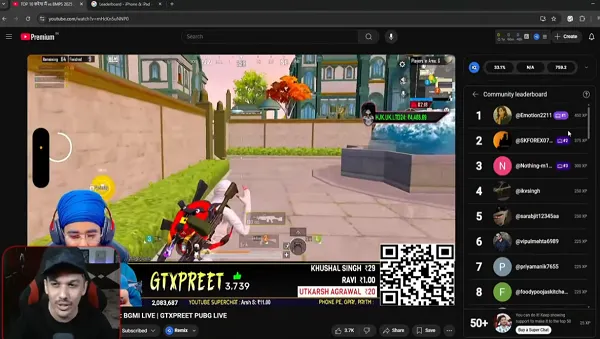
YouTube gaming comment leaderboard

The top three most-engaged viewers will be awarded with a badge that’ll appear next to their name on livestreams, which could help them get noticed by the creator during the broadcast.

After a few months of testing, however, many live creators have indicated that they actually don’t want to display these lists during their stream. So now, YouTube’s adding some easy opt-out options.

As explained by YouTube:

“One of the main pieces of feedback we heard from creators is that you would like to be able to opt out of the leaderboard experience, either before or during a live stream. We’re happy to share that this is now possible. When creating a stream on web, deselect the checkbox leaderboard within the live chat section. And during a live stream on web, creators can use the ‘Edit’ option to customize the stream and deselect the leader board option.”
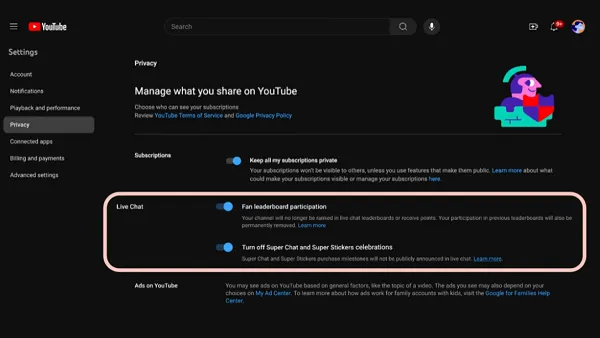
YouTube live leaderboard

So now, creators can switch off this display, which can presumably be a distraction during some stream types.

Though ideally, it will also help to drive more donations, and thus revenue for creators. But some creators have criticized the blatant commoditization of the viewing community, while there are also concerns with user privacy and exposure with this display.

Though most seem to be critical of the fact that YouTube’s copied the idea from Twitch, and it seems that, for some creators at least, they’d prefer to avoid the negative associations here.

So now you can, if you prefer.

On another front, YouTube has also announced that it’s changing the name of the “Copyright” tab in YouTube Studio to “Content Detection” instead.
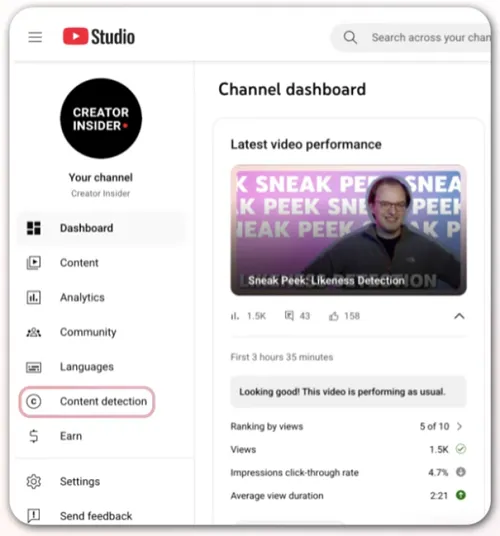
YouTube content detection

With the introduction of its new content and likeness detection tools, the update will better highlight the actual features available in this tab, which are both likely to see more usage than copyright claims for more channels.

So if you’re wondering where your “Copyright” tab went, it’s still there, it’s just under a different name.


Source link

Leaderboards Livestream Opt YouTube
Share. Facebook Twitter Pinterest LinkedIn Tumblr Email
Previous ArticleDifferentiating Brands With Generosity, Surprise, And Delight
Next Article How to re-watch Apple’s iPhone 16, Apple Watch Series 10, and AirPods …
Editor-In-Chief
  • Website

Related Posts

Social Media

AI in Social Media Content Creation and Management

December 22, 2025
Social Media

X Tests Watch History Tab

December 21, 2025
Social Media

Leading the Charge: How Entomomech is Redefining Emergency Plumbing St…

December 20, 2025
Add A Comment
Leave A Reply Cancel Reply

Top Posts

100+ TikTok Statistics Updated for December 2024

December 4, 2024111 Views

How to Fix Cant Sign in Apple Account, Verification Code Not Received …

February 11, 202577 Views

BenQ PD2730S Review – MacRumors

February 14, 202534 Views
Stay In Touch
  • Facebook
  • YouTube
  • TikTok
  • WhatsApp
  • Twitter
  • Instagram
Latest Reviews

Subscribe to Updates

Get the latest tech news from thelinkx.com about tech, gadgets and trendings.

Please enable JavaScript in your browser to complete this form.
Loading
About Us

Welcome to TheLinkX – your trusted source for everything tech and gadgets! We’re passionate about exploring the latest innovations, diving deep into emerging trends, and helping you find the best tech products to suit your needs. Our mission is simple: to make technology accessible, engaging, and inspiring for everyone, from tech enthusiasts to casual users.

Our Picks

Turning your Android phone into a mini Nintendo Switch just got easier

December 22, 2025

How companies can thrive amid sustainable packaging uncertainty

December 22, 2025

Sustainability trends for 2026: From boardroom decisions to real-world…

December 22, 2025

Subscribe to Updates

Get the latest tech news from thelinkx.com about tech, gadgets and trendings.

Please enable JavaScript in your browser to complete this form.
Loading
  • About Us
  • Contact Us
  • Disclaimer
  • Privacy Policy
  • Terms and Conditions
© 2025 Thelinkx.All Rights Reserved Designed by Prince Ayaan

Type above and press Enter to search. Press Esc to cancel.