


Editor’s Desk

Android Central’s Editor’s Desk is a weekly column discussing the latest news, trends, and happenings in the Android and mobile tech space.
A runner I am not. I spend a lot of time at the gym, working out and lifting weights several times a week, but cardio and running are the bane of my existence. I never quite understood how and why anyone would enjoy running. Why subject yourself to that?
However, for the past couple of months, I’ve been using the Pixel Watch 3 and the Fitbit app to do just that. Despite my better judgment, I decided it’s time to change my routine, spending nearly every morning running to see how I can improve the duration and distance of my runs.
To do this, I’ve been utilizing the AI-powered daily run recommendations in the Fitbit app. I’ve been curious to see whether these recommendations are really helpful or if it’s just another glorified AI feature with no real rhyme or reason to its suggestions. Turns out, this could actually be a fantastic tool for beginners like me, making the couch-to-5K journey a little less daunting.
Getting started
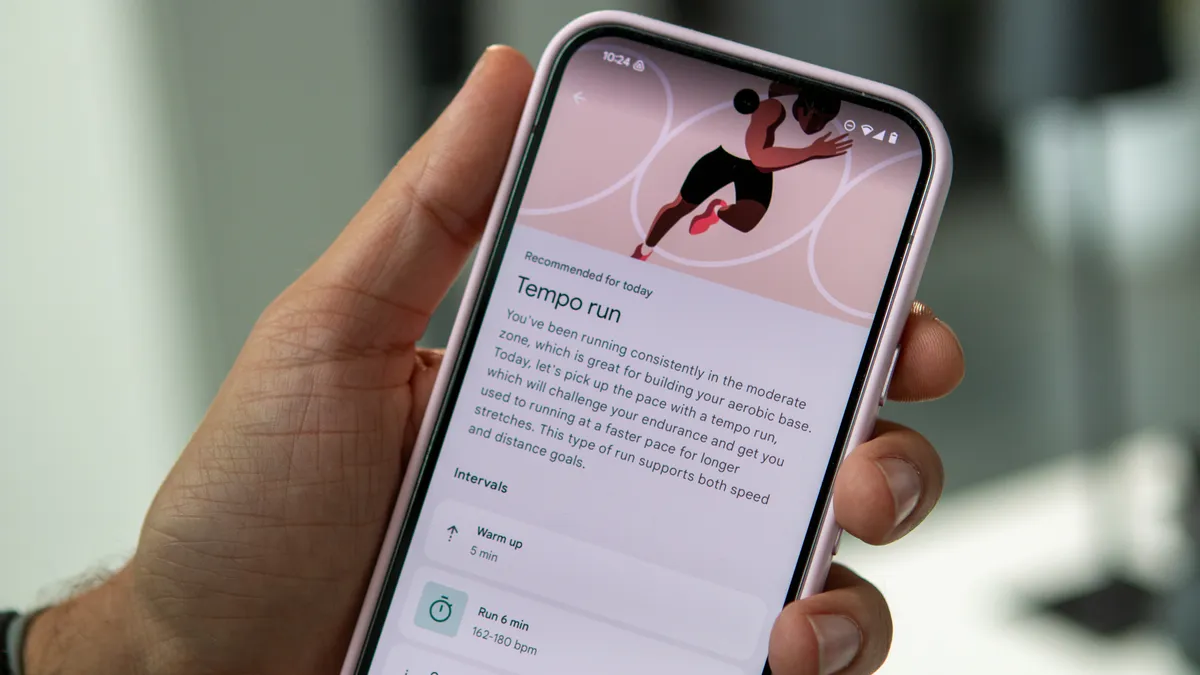
It’s important to note that daily AI run recommendations are only available to Fitbit Premium subscribers. If you buy a new Pixel Watch, it’s likely that you received a free trial, so you might want to check on that if you’re not already a subscriber.
After that, AI-run recommendations should start appearing in the Coach tab. However, you can always change your preferences by tapping the See all button next to Today’s run, then tapping the three-dot menu in the top corner. Here, you can disable daily run workouts, adjust your running level or focus, and change your distance days to focus on longer runs.
Slow and steady

I was initially nervous about starting a running “plan.” My previous experience with a Garmin plan was a bit too intense for me, and I couldn’t keep up, so I went into this cautiously. It’s important to note that this isn’t a running “plan,” per se, so I couldn’t see ahead to what my runs would look like. The Fitbit app would take my previous workout data as well as my target load to surface a new recommendation for me each day.
While a viewable workout plan of some sort would be nice, what I like about this feature is that the workouts feel like they’re perfectly tailored to me and my capabilities. Going into this, I could only comfortably run about a mile before I would tire and have to stop. Therefore, based on what Fitbit knows about me and my goals, it was able to get me started with some very easy runs.

These runs would vary each day, typically between an easy run and a tempo run, with the former keeping me at a relatively moderate heart rate and the latter pushing me into a more vigorous heart rate zone. The duration of the runs also varies, from shorter 18-minute runs to longer 40-minute runs.
That said, even the shorter runs challenged me, as I would previously average about 10 minutes before I called it quits. However, this was a very manageable challenge, as I had a target heart rate range that I would have to maintain. This helped me manage by breathing more effectively, while also reminding me that I do not have to run as fast as I can all the time; I can take my time at a steady pace to keep me going for a longer period of time.
Additionally, Fitbit would also mix things up so the intervals were always different from day to day. Sometimes it would have me do a single run for a certain period of time, or it would break up my run, starting me off slower and steadily pushing me to run faster, or having me maintain a faster pace but for short periods with even shorter rest periods between them. This helped me get used to pacing myself while helping me build my endurance and mileage.

The best part is that you don’t have to follow each run exactly as it appears. There’s a Customize run button at the bottom of each recommendation, where you can remove warm-ups and cool-downs, delete or move intervals around, add intervals, and even edit the intensity of each interval. That said, I rarely found a need for this and just followed each recommendation as it was given to me.
As I noted before, when I first started this just a couple of months ago, I could barely run for more than one mile without tiring myself out. Now, I’m consistently and comfortably running two to three miles per day, and my pace has also improved to just under 12 minutes per mile.
Do I love running now? Definitely not. But I don’t dislike it as much as I used to.
Where Google can improve

While each recommended run explains why it will benefit you before you start it, I do wish there was some sort of built-in AI summary for post-run evaluations. You can view and compare charts as well as form analysis to gauge how efficient your running is, but having something to summarize the data in an easy-to-consume way would help me figure out where and how to improve.
You can always share the post-run data with Gemini, but the experience isn’t very seamless, and Gemini’s responses are a bit general.

I also wish run suggestions would appear on the Pixel Watch. Right now, I can tap the Start run button in the Fitbit smartphone app, and it will send it to the Pixel Watch 3, where I can just tap the Start button. However, this is the extent of its presence on the watch, as AI run recommendations are not even viewable on the Fitbit Wear OS app.
This would be a perfect opportunity to enhance the Morning Brief feature, which feels pretty useless in its current form. Garmin watches like the Venu 4 include daily workout suggestions in the Morning Report, whether or not you have a plan in place, so it feels like a missed opportunity on the Pixel Watch.
I’m excited about what’s to come

Of course, running is just part of my daily routine now, as I also spend a lot of time weightlifting. However, Fitbit’s Coach tab simply surfaces various workouts I can do. While they are based on my daily readiness and workout preferences, it’s simply a collection of video workouts I can follow, and there doesn’t seem to be much rhyme or reason to their recommendations.
This is why I’m excited for the upcoming Personal Health Coach, which will use AI to provide more dynamic fitness recommendations. And not only will you be able to converse with the AI for suggestions, but it appears that it will take all your data into consideration to provide truly personalized fitness guidance.
The Pixel Watch may not be the fitness watch I want now, but the Health Coach could build upon Google’s excellent AI to help it become the fitness watch to beat.
FAQ
How can I access Fitbit’s AI run recommendations?
To receive daily run recommendations, you must be subscribed to Fitbit Premium. The feature is available via the Coach tab in the Fitbit app.
Can users customize the AI run recommendations?
Yes, if you don’t like the suggested run, you can choose from a short list of other suggested runs or customize the daily recommended run by tapping the Customize run button at the bottom. You can also customize your preferences such as your running level, personal goals, and long run days.
Is this the same as the Personal Health Coach?
No, Fitbit’s daily run recommendations are already available in the Fitbit app. The Personal Health Coach is an upcoming AI feature that will be an integral part of the revamped Fitbit app experience, which will go into preview sometime in October, 2025.
