
Close Menu
The LinkxThe Linkx
  • Home
  • Technology
    • Gadgets
    • IoT
    • Mobile
    • Nanotechnology
    • Green Technology
  • Trending
  • Advertising
  • Social Media
    • Branding
    • Email Marketing
    • Video Marketing
  • Shop

Subscribe to Updates

Get the latest tech news from thelinkx.com about tech, gadgets and trendings.

Please enable JavaScript in your browser to complete this form.
Loading
What's Hot

Top 21 Tips, Tricks to Use in Threads App

May 18, 2026

BYD Targets Europe with Smaller, Tailored EV Models

May 18, 2026

Innovating at the Speed of Business: Announcing the Customer Achieveme…

May 18, 2026
Facebook X (Twitter) Instagram
Facebook X (Twitter) Instagram Pinterest Vimeo
The LinkxThe Linkx
  • Home
  • Technology
    • Gadgets
    • IoT
    • Mobile
    • Nanotechnology
    • Green Technology
  • Trending
  • Advertising
  • Social Media
    • Branding
    • Email Marketing
    • Video Marketing
  • Shop
The LinkxThe Linkx
Home»Social Media»YouTube adds chapters and title cards for CTV viewers
Social Media

YouTube adds chapters and title cards for CTV viewers

Editor-In-ChiefBy Editor-In-ChiefMay 18, 2026No Comments3 Mins Read
Share Facebook Twitter Pinterest LinkedIn Tumblr Reddit Telegram Email
YouTube adds chapters and title cards for CTV viewers
Share
Facebook Twitter LinkedIn Pinterest Email


This audio is auto-generated. Please let us know if you have feedback.

YouTube announced some updates to its connected TV options, which will make it easier for CTV viewers to interact with more elements of the app.

First, YouTube has expanded access to its conversational, artificial intelligence-powered search tools to smart TVs, which will make it easier for CTV users to use more of YouTube’s discovery features.
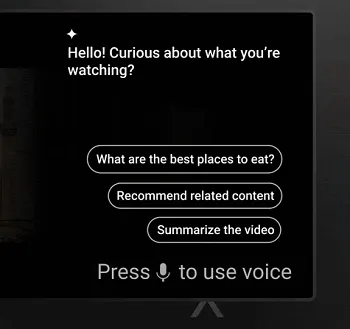
YouTube AI smart TV

As per YouTube: “You can use your remote’s microphone to ask questions about the video you’re watching, or select the sparkle icon to get started.”

YouTube initially announced the addition of AI-powered search on smart TVs last month, but it’s now making it available to more users, providing expanded interaction options for CTV viewers.

YouTube also added a range of additional updates for CTV, including:

  • Chapters in Descriptions – CTV viewers can now access a chapter segment panel within the description of a video, making it easier to navigate to the specific moments of a clip.
  • Gaming Title Cards – YouTube added gaming title cards in video descriptions, which will link CTV viewers to a dedicated game page where they can access more content related to that game.
  • Like Counts on TV – YouTube also added like counts directly to the Watch page on TVs, providing more context into how other viewers are engaging with videos.
  • Immersive Artist Headers – Official artist channels will now feature immersive full-screen previews when hovering over the Shuffle and Radio playback buttons.

In addition to these updates, YouTube is also rolling out an improved top channels shelf to highlight more content relevant to the viewer’s interests, and “Up Next” teasers at the end of video clips. It’s also expanding its Stations experiment, which includes curated videos in a continuous stream.

YouTube has also simplified its family groups option for those viewing on their family TV set.

As per YouTube: “We’ve made it easier for everyone in your household to have a safe and personalized YouTube experience. If you are part of a Google Family Group or have a supervised account for your kid or teen, members of your family will now appear on the ‘Who’s Watching’ screen, where you can switch between accounts seamlessly.”

YouTube has seen a big rise in CTV consumption in recent years, with YouTube now arguably rivaling traditional TV stations as a key entertainment alternative.

That provides significant opportunities for the platform, which is why YouTube continues to refine its CTV viewing experience and bring more elements of its main app to couch viewers.   


Source link

Adds cards chapters CTV Title Viewers YouTube
Share. Facebook Twitter Pinterest LinkedIn Tumblr Email
Previous ArticleNatalia Dyer Named Global Muse for Purito Seoul
Next Article iOS 27 to Let Users Generate Wallpapers and Build Shortcuts With AI
Editor-In-Chief
  • Website

Related Posts

Social Media

Americans On Alert During Seismic Awakening: Earthquakes Are Intensify…

May 17, 2026
Social Media

Meta opens up Display AI glasses to third-party developers

May 16, 2026
Social Media

Facing the Shadows: How Confronting Suppressed Memories Unlocks Your F…

May 15, 2026
Add A Comment
Leave A Reply Cancel Reply

Top Posts

New IPA president Karen Martin delivers rousing call to creative actio…

April 1, 2025207 Views

100+ TikTok Statistics Updated for December 2024

December 4, 2024139 Views

How to Fix Cant Sign in Apple Account, Verification Code Not Received …

February 11, 2025112 Views
Stay In Touch
  • Facebook
  • YouTube
  • TikTok
  • WhatsApp
  • Twitter
  • Instagram
Latest Reviews

Subscribe to Updates

Get the latest tech news from thelinkx.com about tech, gadgets and trendings.

Please enable JavaScript in your browser to complete this form.
Loading
About Us

Welcome to TheLinkX – your trusted source for everything tech and gadgets! We’re passionate about exploring the latest innovations, diving deep into emerging trends, and helping you find the best tech products to suit your needs. Our mission is simple: to make technology accessible, engaging, and inspiring for everyone, from tech enthusiasts to casual users.

Our Picks

Top 21 Tips, Tricks to Use in Threads App

May 18, 2026

BYD Targets Europe with Smaller, Tailored EV Models

May 18, 2026

Innovating at the Speed of Business: Announcing the Customer Achieveme…

May 18, 2026

Subscribe to Updates

Get the latest tech news from thelinkx.com about tech, gadgets and trendings.

Please enable JavaScript in your browser to complete this form.
Loading
  • About Us
  • Contact Us
  • Disclaimer
  • Privacy Policy
  • Terms and Conditions
© 2026 Thelinkx.All Rights Reserved Designed by Prince Ayaan

Type above and press Enter to search. Press Esc to cancel.