
Close Menu
The LinkxThe Linkx
  • Home
  • Technology
    • Gadgets
    • IoT
    • Mobile
    • Nanotechnology
    • Green Technology
  • Trending
  • Advertising
  • Social Media
    • Branding
    • Email Marketing
    • Video Marketing
  • Shop

Subscribe to Updates

Get the latest tech news from thelinkx.com about tech, gadgets and trendings.

Please enable JavaScript in your browser to complete this form.
Loading
What's Hot

How to Fix iPhone Not Booting Up With Wireless Recovery Process

February 21, 2026

Urban mining enters the supply-chain risk conversation

February 21, 2026

Caviar announces Apple iPhone Air that features 24k gold and costs ove…

February 21, 2026
Facebook X (Twitter) Instagram
Facebook X (Twitter) Instagram Pinterest Vimeo
The LinkxThe Linkx
  • Home
  • Technology
    • Gadgets
    • IoT
    • Mobile
    • Nanotechnology
    • Green Technology
  • Trending
  • Advertising
  • Social Media
    • Branding
    • Email Marketing
    • Video Marketing
  • Shop
The LinkxThe Linkx
Home»Gadgets»How to Fix iPhone Not Booting Up With Wireless Recovery Process
Gadgets

How to Fix iPhone Not Booting Up With Wireless Recovery Process

Editor-In-ChiefBy Editor-In-ChiefFebruary 21, 2026No Comments4 Mins Read
Share Facebook Twitter Pinterest LinkedIn Tumblr Reddit Telegram Email
How to Fix iPhone Not Booting Up With Wireless Recovery Process
Share
Facebook Twitter LinkedIn Pinterest Email


  • Once you bring a working iPhone near the affected iPhone, you will see a pop-up on the working iPhone that says “Restore Nearby iPhone”.
  • After this, you will receive a code on the affected iPhone that you must enter on the iPhone used for recovery.
  • Some causes that can lead to a failure in installation are weak internet, low storage, a corrupted firmware package, or the phone battery dying mid-update.

iPhones are great devices, but sometimes they can encounter issues or bugs that can hinder the Apple experience. One such issue is an iPhone not booting up or stuck in recovery mode. The frequency of users reporting this has increased since the iOS 26 rollout. This has been a major update in recent years with respect to previous iOS versions. Users report that their iPhones power off and do not display the Apple logo when attempting to boot. However, like most bugs, this can be fixed with some workarounds.
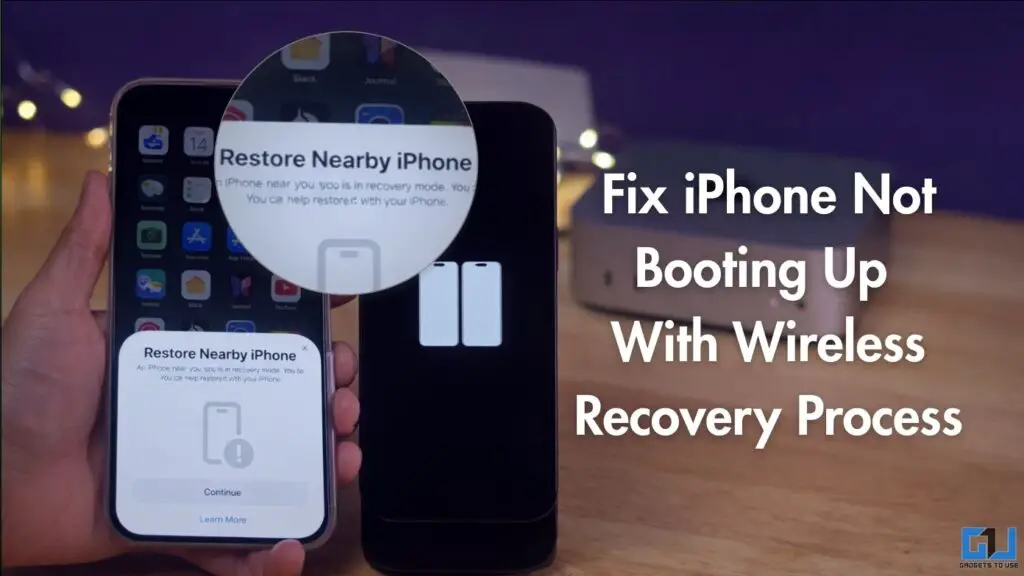
Fix iPhone Not Booting Up 
With Wireless Recovery Process

Fix iPhone Not Booting With Wireless Recovery

The workaround that works for your device depends on its version. If the affected device is running iOS 18, you can try the ‘Restore Nearby iPhone’ method.

1. Your iPhone must be showing a silhouette of 2 iPhones on a black screen. This means you should bring another iPhone or iPad running iOS 18 or later near the affected device.
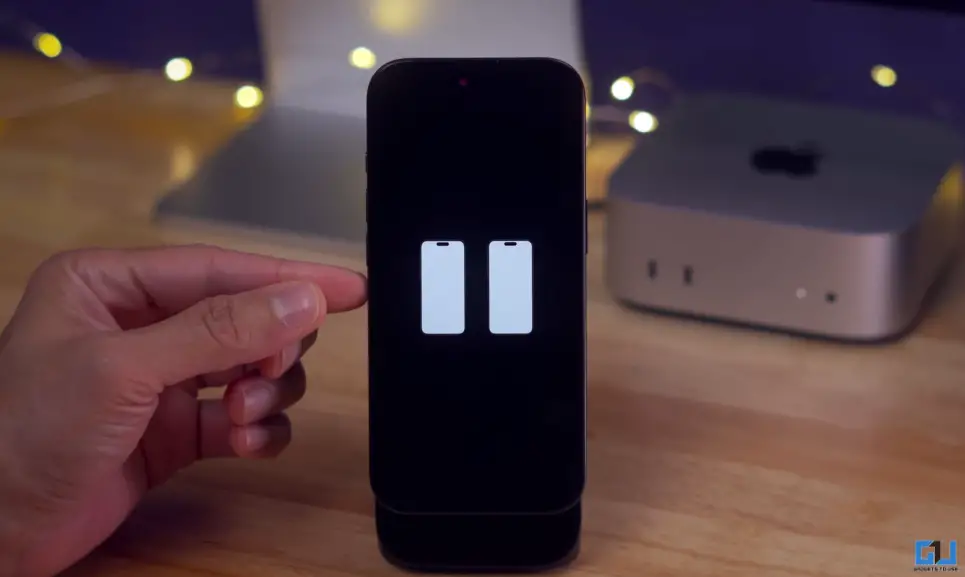
    2 iphones icon

    2. Once you bring a working iPhone near the affected iPhone, you will see a pop-up on the working iPhone that says “Restore Nearby iPhone”. Now tap ‘Continue’.
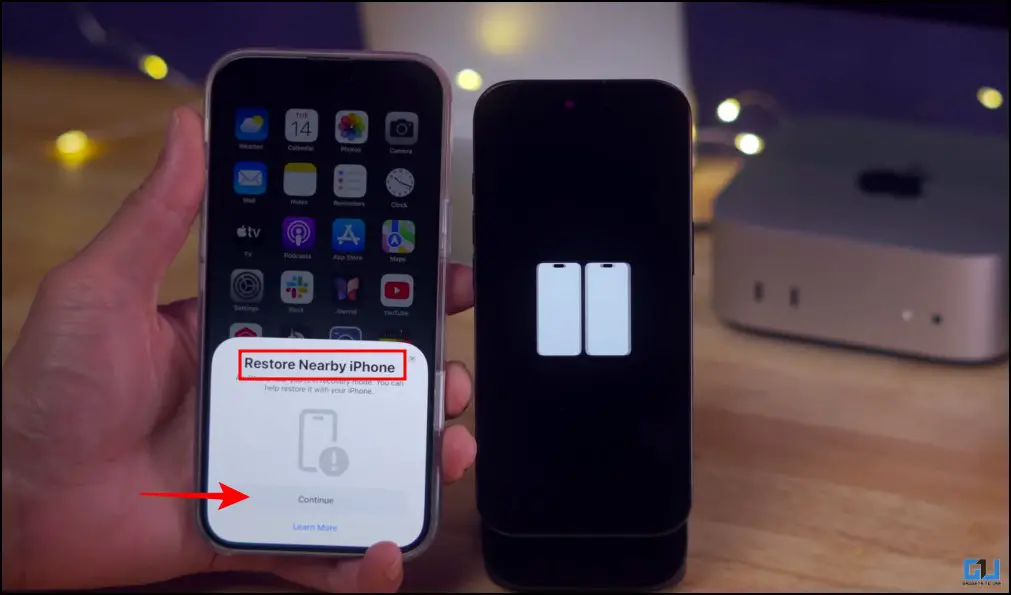
    restore nearby iphone pop out

    3. After this, you will receive a code on the affected iPhone that you must enter on the iPhone used for recovery.
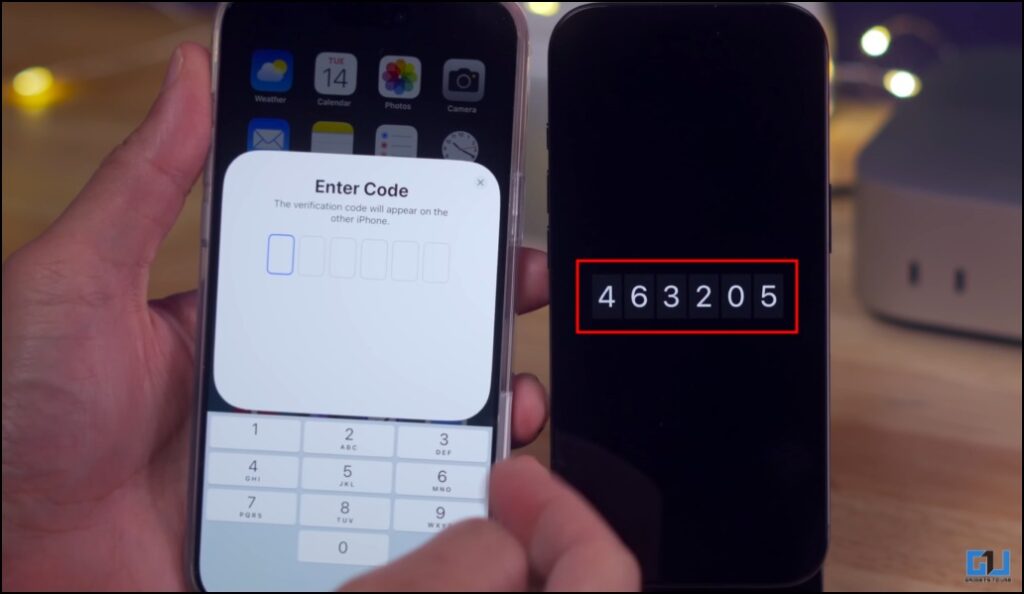
    recovery code

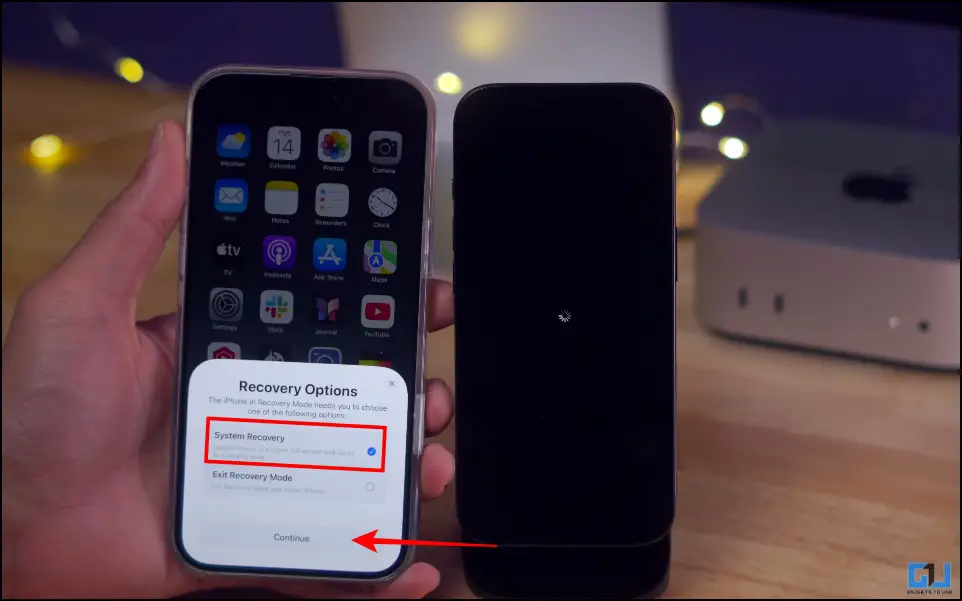
    4. You will get the ‘System Recovery’ or ‘Exit Recovery Mode’ options. Select ‘System Recovery’, and tap ‘Continue’.
    select system recovery

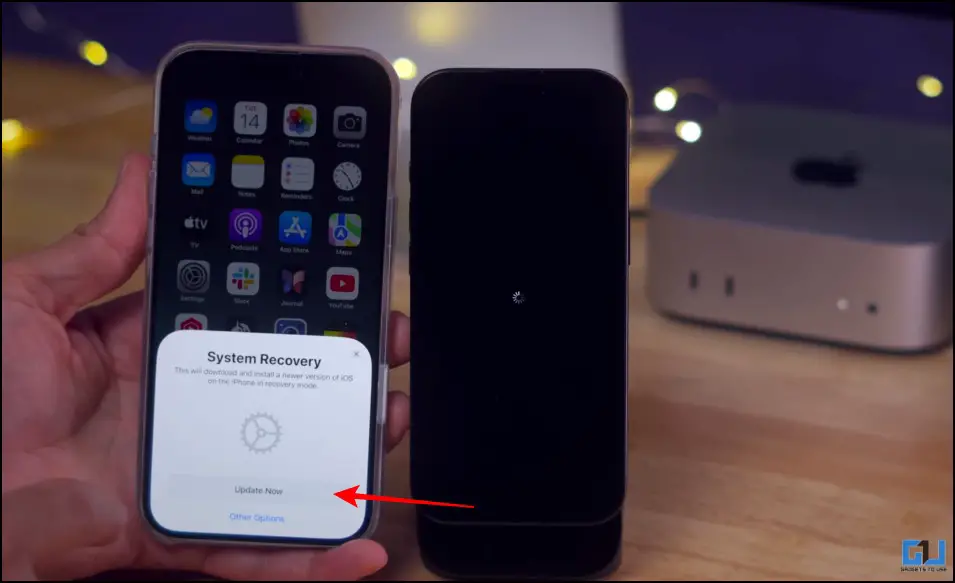
    5. Now hit ‘Update Now’, and the progress will start on both phones.
    update now

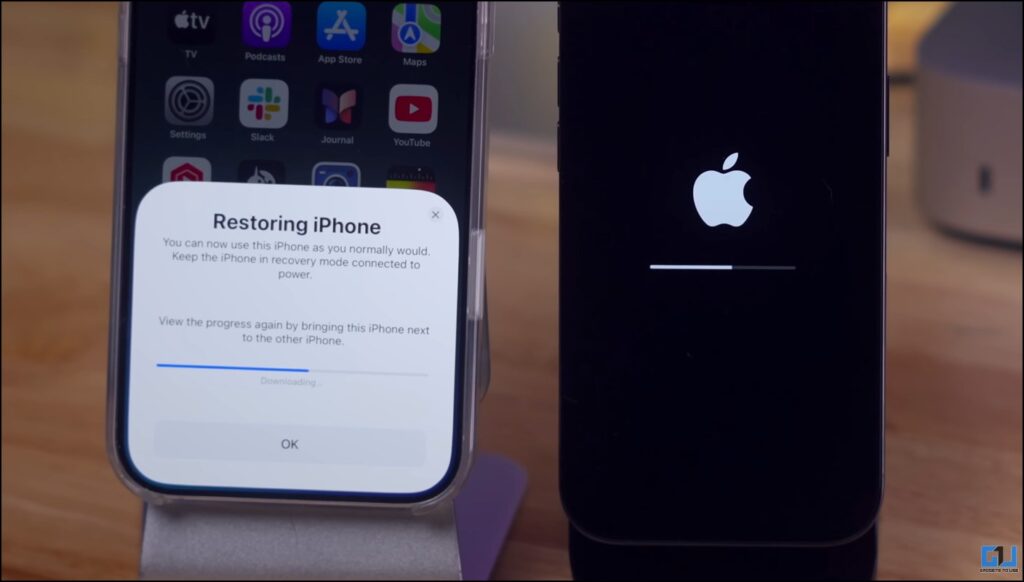
    This would take some time. Once the progress is done, the affected iPhone will be restored.
    recovery process

    Why Does It Happen Exactly?

    This typically occurs while you are updating the system. This is because during the update, the system temporarily removes key system files while installing the new iOS version. If installation fails, the device cannot load the operating system. This causes the device to enter recovery mode. Some causes that can lead to a failure in installation are weak internet, low storage, a corrupted firmware package, or the phone battery dying mid-update.

    FAQs

    Q. What if the ‘Restore Nearby iPhone’ doesn’t appear?

    Make sure both devices are connected to the same Wi-Fi network, and they have the compatible versions. Unlock the device that you would use for recovery and place it beside the affected device.

    Q. Will my data be erased during wireless recovery?

    In most cases, your data will be secure during and after the restoration. However, it’s suggested that you have a cloud or local backup if you have important data in your device.

    Wrapping Up

    The phone not booting up might feel like a panic situation, but it can be fixed through the ‘Restore Nearby iPhone’ method. This is a good feature, given that Apple is aiming to reduce dependence on computers and make recovery accessible without visiting service centres. Although in regions where Apple devices are not that common, traditional recovery methods would have to be deployed in order to fix your iPhone.

    You may also like to read:

    Have any questions related to our how-to guides, or anything in the world of technology? Check out our new GadgetsToUse AI Chatbot for free, powered by ChatGPT.

    You can also follow us for instant tech news at Google News or for tips and tricks, smartphones & gadgets reviews, join the GadgetsToUse Telegram Group, or subscribe to the GadgetsToUse Youtube Channel for the latest review videos.

    Was this article helpful?

    YesNo


Source link

booting Fix iPhone process Recovery Wireless
Share. Facebook Twitter Pinterest LinkedIn Tumblr Email
Previous ArticleUrban mining enters the supply-chain risk conversation
Editor-In-Chief
  • Website

Related Posts

Mobile

Caviar announces Apple iPhone Air that features 24k gold and costs ove…

February 21, 2026
Gadgets

2 thrilling box office hits I can’t wait to watch this weekend on Netf…

February 20, 2026
Gadgets

What’s the Difference Between Tesla’s Cybercab and Robotaxi?

February 19, 2026
Add A Comment
Leave A Reply Cancel Reply

Top Posts

New IPA president Karen Martin delivers rousing call to creative actio…

April 1, 2025132 Views

100+ TikTok Statistics Updated for December 2024

December 4, 2024119 Views

How to Fix Cant Sign in Apple Account, Verification Code Not Received …

February 11, 202595 Views
Stay In Touch
  • Facebook
  • YouTube
  • TikTok
  • WhatsApp
  • Twitter
  • Instagram
Latest Reviews

Subscribe to Updates

Get the latest tech news from thelinkx.com about tech, gadgets and trendings.

Please enable JavaScript in your browser to complete this form.
Loading
About Us

Welcome to TheLinkX – your trusted source for everything tech and gadgets! We’re passionate about exploring the latest innovations, diving deep into emerging trends, and helping you find the best tech products to suit your needs. Our mission is simple: to make technology accessible, engaging, and inspiring for everyone, from tech enthusiasts to casual users.

Our Picks

How to Fix iPhone Not Booting Up With Wireless Recovery Process

February 21, 2026

Urban mining enters the supply-chain risk conversation

February 21, 2026

Caviar announces Apple iPhone Air that features 24k gold and costs ove…

February 21, 2026

Subscribe to Updates

Get the latest tech news from thelinkx.com about tech, gadgets and trendings.

Please enable JavaScript in your browser to complete this form.
Loading
  • About Us
  • Contact Us
  • Disclaimer
  • Privacy Policy
  • Terms and Conditions
© 2026 Thelinkx.All Rights Reserved Designed by Prince Ayaan

Type above and press Enter to search. Press Esc to cancel.