
Close Menu
The LinkxThe Linkx
  • Home
  • Technology
    • Gadgets
    • IoT
    • Mobile
    • Nanotechnology
    • Green Technology
  • Trending
  • Advertising
  • Social Media
    • Branding
    • Email Marketing
    • Video Marketing
  • Shop

Subscribe to Updates

Get the latest tech news from thelinkx.com about tech, gadgets and trendings.

Please enable JavaScript in your browser to complete this form.
Loading
What's Hot

Amazon sells MOBA March of Giants to Ubisoft

December 15, 2025

Renewable Energy, Economics, & Inertia

December 15, 2025

OnePlus is cooking up a brand new phone series for 2026 — but will you…

December 15, 2025
Facebook X (Twitter) Instagram
Facebook X (Twitter) Instagram Pinterest Vimeo
The LinkxThe Linkx
  • Home
  • Technology
    • Gadgets
    • IoT
    • Mobile
    • Nanotechnology
    • Green Technology
  • Trending
  • Advertising
  • Social Media
    • Branding
    • Email Marketing
    • Video Marketing
  • Shop
The LinkxThe Linkx
Home»Gadgets»Turn on 3 Settings Before Taking Screenshots in Color OS 16 Phones
Gadgets

Turn on 3 Settings Before Taking Screenshots in Color OS 16 Phones

Editor-In-ChiefBy Editor-In-ChiefNovember 13, 2025No Comments3 Mins Read
Share Facebook Twitter Pinterest LinkedIn Tumblr Reddit Telegram Email
Turn on 3 Settings Before Taking Screenshots in Color OS 16 Phones
Share
Facebook Twitter LinkedIn Pinterest Email


  • Now, in my line of work, I take a lot of screenshots on a regular basis, and in between continuous screenshots, I have to wait for a couple of seconds because of the preview window.
  • I had the chance to experience it on the Oppo X9, and I discovered something that no one has talked about, and it is actually useful.
  • Once you tap on Software, you will see the OS version your phone is running on, and if there is any update, it will be reflected at the bottom.

ColourOS 16 is now live, and there are a lot of positive reviews. I had the chance to experience it on the Oppo X9, and I discovered something that no one has talked about, and it is actually useful. Now, in my line of work, I take a lot of screenshots on a regular basis, and in between continuous screenshots, I have to wait for a couple of seconds because of the preview window. This is something that has bothered me for a while, but now I can disable it along with the screenshot notification. Let me tell you all about it.
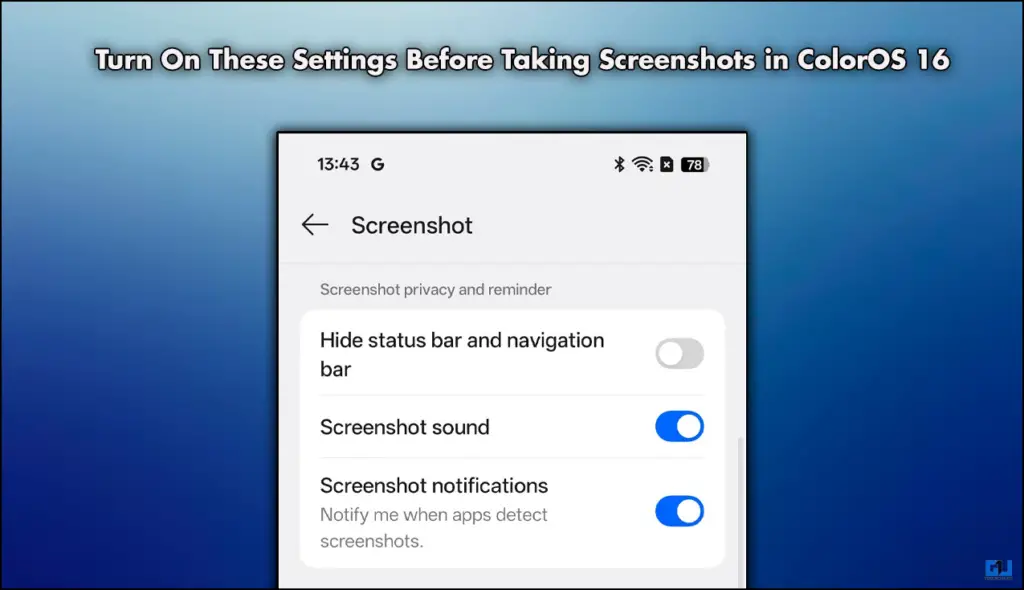
Turn On These Settings Before Taking Screenshots in ColorOS 16

Why Should You Enable These Settings?

The simple answer is that these settings will change the way you take screenshots. Meaning I will have control of the sound, animation, preview, and notification. Not only this, but I can also hide the notification and navigation bar from the screenshots. Giving me a much cleaner screengrab. This can be very useful when you are collecting data for presentations or your case studies. Here is how I enabled these settings.

Steps to Enable Screenshot Settings

Head over to the device’s settings and follow the steps mentioned below.

1. Open Settings and scroll down to Accessibility & Convenience.

Accesibility & Convinence

2. In the next menu, tap on Screenshots.
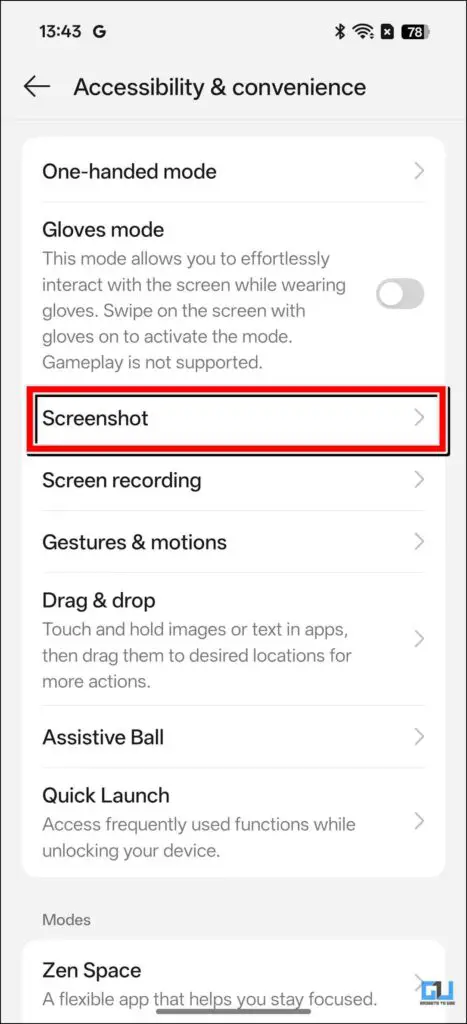
screenshot options in settings

3. From the next menu, scroll down, and you will see multiple options.

4. You can toggle on and off according to your choices.
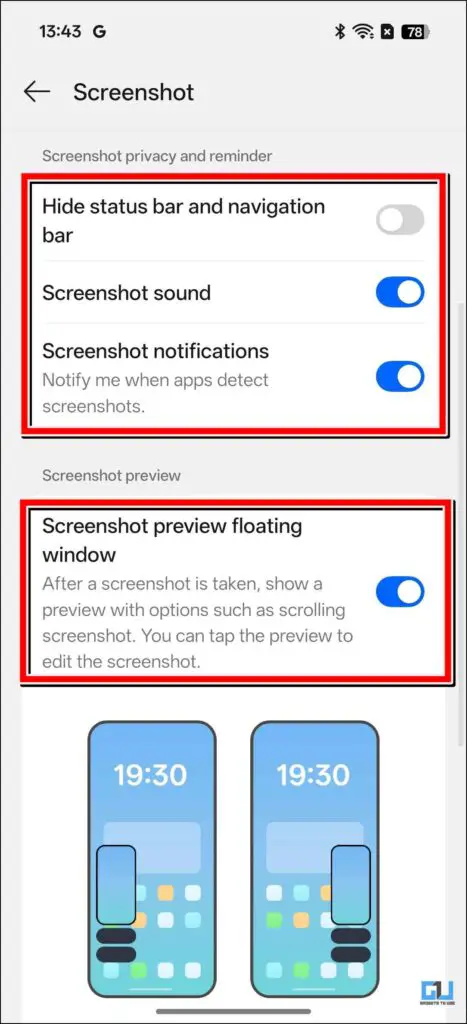
Screenshot settings - 1

5. If you want to automatically delete the original screenshot after you have edited it, you can also do that.
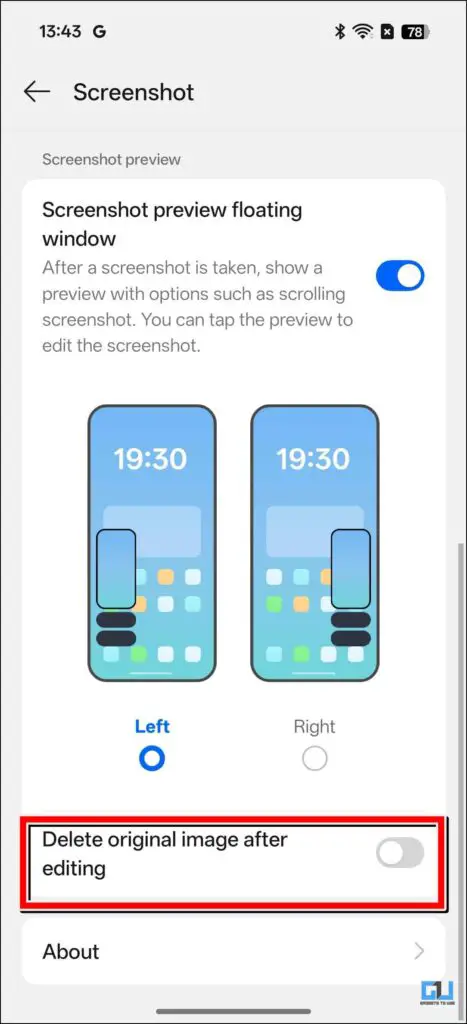
Screenshot settings - 2

FAQs

Q. Will the Reno series from Oppo receive the ColorOS 16 update?

Yes, both the Reno 13 and 14 series will be getting the latest ColourOS 16 update in November. So if you have a device of either series, then keep checking for updates.

Q. How can I check for updates on my Oppo device?

To check for software updates, you need to go to Settings> System > Software. Once you tap on Software, you will see the OS version your phone is running on, and if there is any update, it will be reflected at the bottom.

Wrapping Up

This article talks about a few useful features that are centered around screenshots. These features allow you to control many things, such as previewing screenshots, adjusting sound, enabling notifications, and editing. You can play around and change the settings to your liking.

Have any questions related to our how-to guides, or anything in the world of technology? Check out our new GadgetsToUse AI Chatbot for free, powered by ChatGPT.

You can also follow us for instant tech news at Google News or for tips and tricks, smartphones & gadgets reviews, join the GadgetsToUse Telegram Group, or subscribe to the GadgetsToUse Youtube Channel for the latest review videos.

Was this article helpful?

YesNo


Source link

Android color Oppo phones Screenshots settings turn
Share. Facebook Twitter Pinterest LinkedIn Tumblr Email
Previous ArticleJust My Type – Hackster.io
Next Article Geico Unveils a Verby New Slogan
Editor-In-Chief
  • Website

Related Posts

Gadgets

Amazon sells MOBA March of Giants to Ubisoft

December 15, 2025
Gadgets

I Found This Crafty Rotary Tool for Only $56 This Black Friday and It’…

December 14, 2025
Gadgets

I Made My Own Smart Speaker Powered By ChatGPT (It Actually Works)

December 13, 2025
Add A Comment
Leave A Reply Cancel Reply

Top Posts

100+ TikTok Statistics Updated for December 2024

December 4, 2024110 Views

How to Fix Cant Sign in Apple Account, Verification Code Not Received …

February 11, 202577 Views

BenQ PD2730S Review – MacRumors

February 14, 202534 Views
Stay In Touch
  • Facebook
  • YouTube
  • TikTok
  • WhatsApp
  • Twitter
  • Instagram
Latest Reviews

Subscribe to Updates

Get the latest tech news from thelinkx.com about tech, gadgets and trendings.

Please enable JavaScript in your browser to complete this form.
Loading
About Us

Welcome to TheLinkX – your trusted source for everything tech and gadgets! We’re passionate about exploring the latest innovations, diving deep into emerging trends, and helping you find the best tech products to suit your needs. Our mission is simple: to make technology accessible, engaging, and inspiring for everyone, from tech enthusiasts to casual users.

Our Picks

Amazon sells MOBA March of Giants to Ubisoft

December 15, 2025

Renewable Energy, Economics, & Inertia

December 15, 2025

OnePlus is cooking up a brand new phone series for 2026 — but will you…

December 15, 2025

Subscribe to Updates

Get the latest tech news from thelinkx.com about tech, gadgets and trendings.

Please enable JavaScript in your browser to complete this form.
Loading
  • About Us
  • Contact Us
  • Disclaimer
  • Privacy Policy
  • Terms and Conditions
© 2025 Thelinkx.All Rights Reserved Designed by Prince Ayaan

Type above and press Enter to search. Press Esc to cancel.