
Close Menu
The LinkxThe Linkx
  • Home
  • Technology
    • Gadgets
    • IoT
    • Mobile
    • Nanotechnology
    • Green Technology
  • Trending
  • Advertising
  • Social Media
    • Branding
    • Email Marketing
    • Video Marketing
  • Shop

Subscribe to Updates

Get the latest tech news from thelinkx.com about tech, gadgets and trendings.

Please enable JavaScript in your browser to complete this form.
Loading
What's Hot

Everything we expect from the year’s biggest tech event

December 27, 2025

Volkswagen Renaissance Begins In China

December 27, 2025

Streamlining Amazon Sidewalk Device Fleet Management with AWS IoT Core…

December 27, 2025
Facebook X (Twitter) Instagram
Facebook X (Twitter) Instagram Pinterest Vimeo
The LinkxThe Linkx
  • Home
  • Technology
    • Gadgets
    • IoT
    • Mobile
    • Nanotechnology
    • Green Technology
  • Trending
  • Advertising
  • Social Media
    • Branding
    • Email Marketing
    • Video Marketing
  • Shop
The LinkxThe Linkx
Home»Trending»Messages on iOS 26 will make it harder to fall for phishing scams
Trending

Messages on iOS 26 will make it harder to fall for phishing scams

Editor-In-ChiefBy Editor-In-ChiefJuly 23, 2025No Comments3 Mins Read
Share Facebook Twitter Pinterest LinkedIn Tumblr Reddit Telegram Email
Messages on iOS 26 will make it harder to fall for phishing scams
Share
Facebook Twitter LinkedIn Pinterest Email


While even tech-savvy users can fall for elaborate phishing scams, most attacks are designed to target less technically inclined people.

With that in mind, the new Messages app in iOS 26 introduces (or better yet, removes) two things that could make a pretty big difference in keeping users safe, regardless of how familiar they may be with phishing tactics.

The new Messages app splits conversations into a few categories, accessible via the filter button in the top right: Messages, Unknown Senders, Spam, and Recently Deleted.
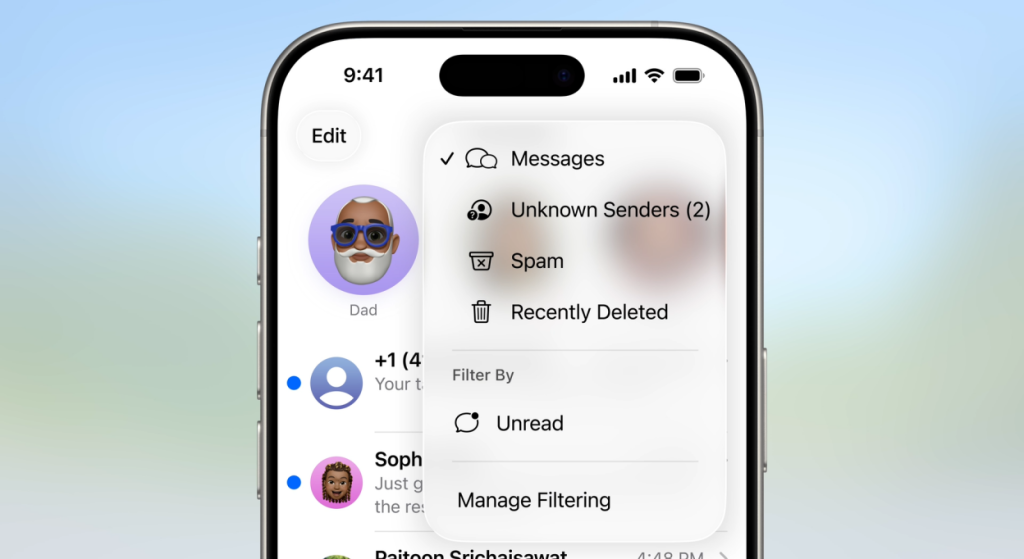
ios 26 spam scam unkown senders messages app filter wwdc 2025

The ‘Messages’ view includes your regular chats with contacts, as well as things like verification codes and reservation confirmations. Meanwhile, ‘Unknown Senders’ and ‘Spam’ messages won’t trigger notifications.

Users can manually turn on or off filtering for both ‘Unknown Senders’ and ‘Spam’, with each filter controlled separately from the ‘Manage Filtering’ option in the top-right menu.

In the ‘Unknown Senders’ folder, users can choose to “Mark as Known” any conversations from contacts they know and trust. And while Apple notes that messages from unknown senders may be automatically marked as spam, messages in the ‘Spam’ folder can be moved back to the main Messages view, with the option to report the number to Apple as not spam.
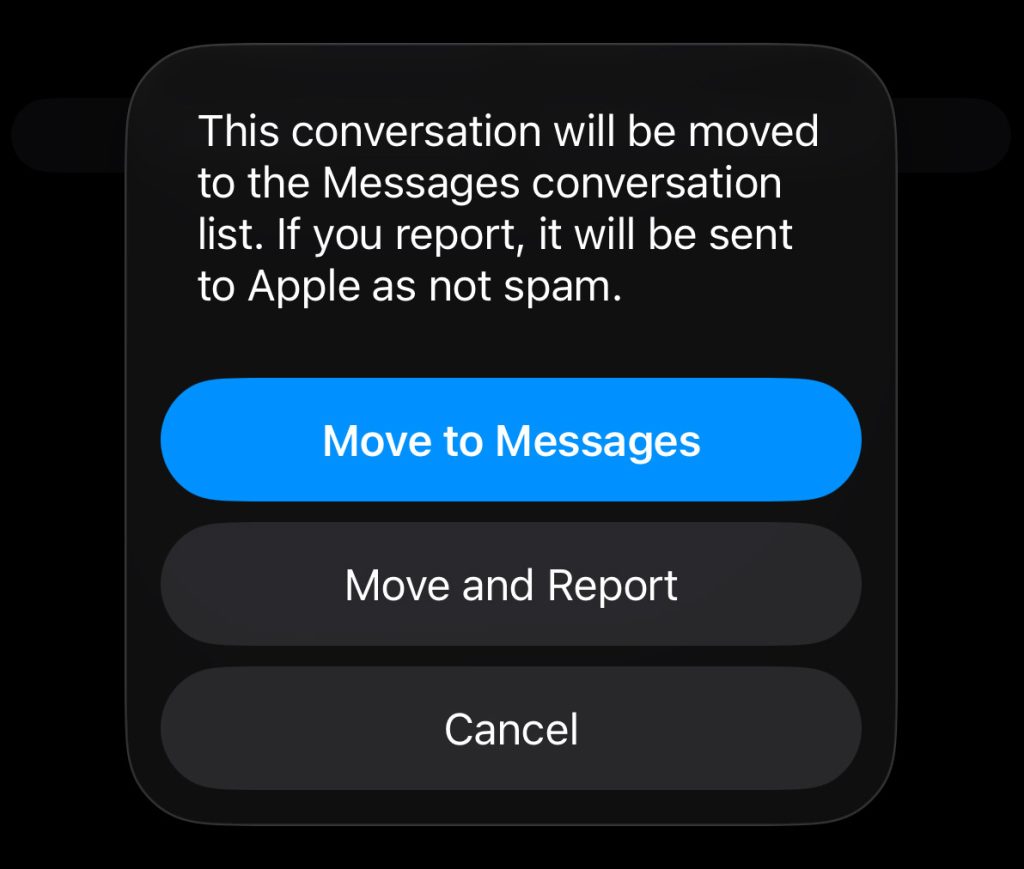
Messages has two weapons against phising spam

All of that said, Apple is applying two specific restrictions to messages in the ‘Spam’ folder, which will make it harder to fall for potentially malicious texts.

  1. Links are disabled. This means that any phone numbers or external URLs contained in the message won’t be readily tappable. That alone could help prevent the user from accidentally calling a scam service or landing on a malicious website with a single tap.
  2. Users can’t reply to messages in the Spam folder, which makes it harder to engage with a potential scammer. And while it’s easy to move a message from ‘Spam’ back to the main Messages view, that small bit of friction can go a long way in helping users avoid accidentally falling for a phishing attempt.

What else is new with Messages on iOS 26?

The new Messages app now supports polls, including the option to have Apple Intelligence suggest a poll based on the context of your conversation.

Typing indicators are now available in group chats, and users can also set a custom chat background. Backgrounds can be chosen from the photo library or generated using Image Playground.

Accessory deals on Amazon

FTC: We use income earning auto affiliate links. More.


Source link

Fall harder iOS Messages Phishing Scams
Share. Facebook Twitter Pinterest LinkedIn Tumblr Email
Previous ArticleWhy Junk Pickup Companies Should Be Part of Disaster Recovery Planning
Next Article No iOS 26 Public Beta Yet but It Could Land on Your iPhone Soon
Editor-In-Chief
  • Website

Related Posts

Trending

Apple Tested AirPods in Bright Colors

December 27, 2025
Trending

HomeKit, Thread, Matter, and more

December 26, 2025
Trending

A critical flaw in Windows Imaging Component

December 23, 2025
Add A Comment
Leave A Reply Cancel Reply

Top Posts

100+ TikTok Statistics Updated for December 2024

December 4, 2024111 Views

How to Fix Cant Sign in Apple Account, Verification Code Not Received …

February 11, 202577 Views

BenQ PD2730S Review – MacRumors

February 14, 202534 Views
Stay In Touch
  • Facebook
  • YouTube
  • TikTok
  • WhatsApp
  • Twitter
  • Instagram
Latest Reviews

Subscribe to Updates

Get the latest tech news from thelinkx.com about tech, gadgets and trendings.

Please enable JavaScript in your browser to complete this form.
Loading
About Us

Welcome to TheLinkX – your trusted source for everything tech and gadgets! We’re passionate about exploring the latest innovations, diving deep into emerging trends, and helping you find the best tech products to suit your needs. Our mission is simple: to make technology accessible, engaging, and inspiring for everyone, from tech enthusiasts to casual users.

Our Picks

Everything we expect from the year’s biggest tech event

December 27, 2025

Volkswagen Renaissance Begins In China

December 27, 2025

Streamlining Amazon Sidewalk Device Fleet Management with AWS IoT Core…

December 27, 2025

Subscribe to Updates

Get the latest tech news from thelinkx.com about tech, gadgets and trendings.

Please enable JavaScript in your browser to complete this form.
Loading
  • About Us
  • Contact Us
  • Disclaimer
  • Privacy Policy
  • Terms and Conditions
© 2025 Thelinkx.All Rights Reserved Designed by Prince Ayaan

Type above and press Enter to search. Press Esc to cancel.