


- Yes, you can easily shoot portraits and landscape videos at the same time from a single phone by using the ReFrame app on iPhone and framing the subject strategically on Android.
- Aligning the subject between the 2 grid lines in the centre would guide you to crop the video in 9.
- Ensure the video is recorded in 4K, the grid lines are enabled, and the subject is centered between the two grid lines.
As a content creator, making content for multiple formats or platforms is the way to go nowadays. And that often means optimising the content for Short-form (Portrait) and Long-form (Landscape) formats. However, shooting for both separately can be time-consuming. Furthermore, cropping a frame to fit into a format that it wasn’t shot into can be a hassle while editing. It would be much more convenient if we shot in both formats simultaneously, and that too with a single device. Since many creators shoot through their mobile phones, let’s see how they can do this.
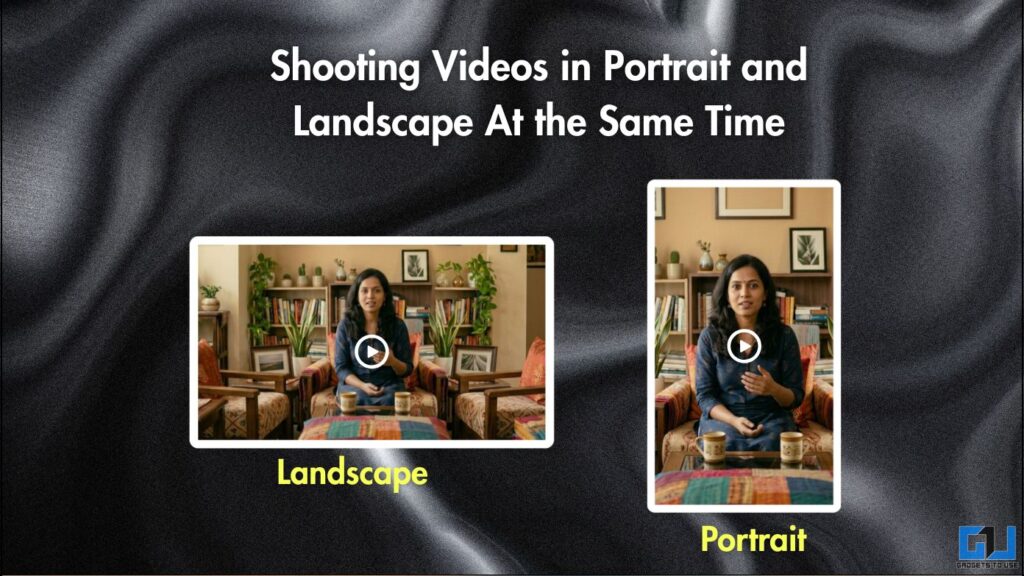
Shooting Videos in Portrait and Landscape At the Same Time
There are two main aspect ratios that are popularly supported across platforms and video formats. These are:
- 16:9 (Landscape), which is used for long-form videos on platforms such as YouTube.
- 9:16 (Portrait), used for short-form videos on Instagram Reels, YouTube Shorts, TikTok, and other such platforms.
Many content creators like to build an audience across platforms. And if they can optimise, shooting their videos once and using them across multiple formats can be crucial to that. These approaches focus on creators who shoot their videos with their smartphones. Then, whether you are an iPhone or Android user, you can use the approaches below accordingly.
For iPhone User
If you are an iPhone user, you can simply download the ReFrame App from the App Store. This is a free app that can record portrait and landscape video simultaneously.
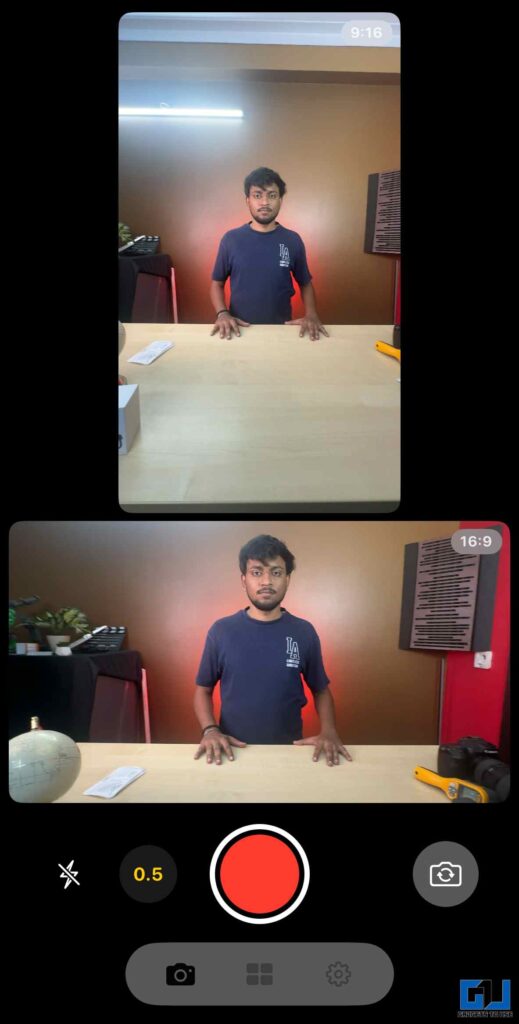
- It uses multiple available lenses on your phone to capture two separate videos. Both of which are saved to the gallery or the Photos app.
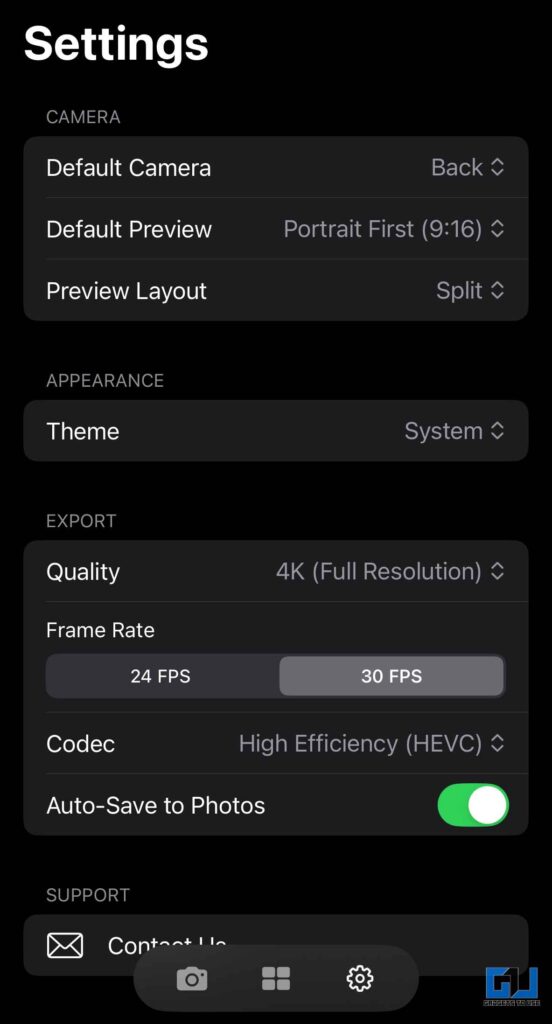
- You can customise the video quality, frame rates, preview layout, and video codec, even switch the camera between front and rear. You can also choose whether you want the recorded videos to be automatically saved to Photos.
- Additionally, you can also access the built-in gallery to browse and manage your recording sessions.
For Android Users
Although there isn’t an Android app that supports simultaneous multi-lens video capture yet, you can still achieve similar results. Just follow the steps below:
1. Open your camera app and go to settings. Next, go to the camera settings and enable the 3×3 grid lines.
2. Ensure the camera is shooting in 4K. This would allow you to flexibly crop without losing quality.
3. Place your smartphone in landscape orientation to shoot the video. Also, ensure that the subject is aligned between the two vertical grid lines in the centre.
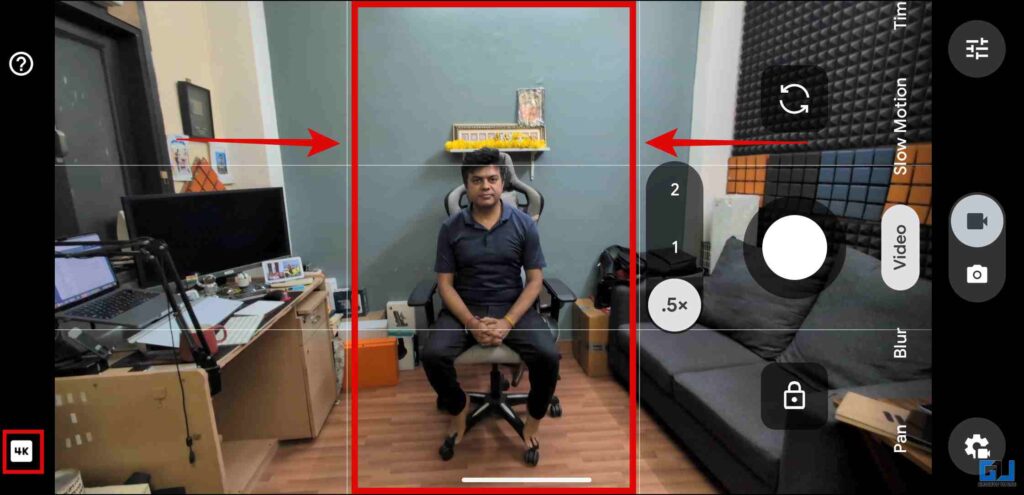
Aligning the subject between the 2 grid lines in the centre would guide you to crop the video in 9:16 (portrait). You can crop the frame using the built-in edit options in the gallery. Besides, you also use the 9:16 cropping preset in a third-party editor. You would easily get the 16:9 (landscape) footage you shot, as well as the 9:16 (portrait) footage, since the subject is centred in the frame. It is recommended to use a tripod to get stable footage and keep the subject aligned.
FAQs
Q. Is it possible to shoot portrait and landscape videos at the same time?
Yes, you can easily shoot portraits and landscape videos at the same time from a single phone by using the ReFrame app on iPhone and framing the subject strategically on Android.
Q. What are the best practices to follow while trying to shoot multi-format videos on Android?
Ensure the video is recorded in 4K, the grid lines are enabled, and the subject is centered between the two grid lines.
Wrapping Up
Shooting portrait and landscape videos simultaneously with the same device really makes it easier to manage your content. This is handy for creators who post content across platforms, as it supports different formats. Especially for content such as interviews, podcasts, vlogs, and much more. Then, whether you are using an app like ReFrame on iPhones or framing the subject smartly on Android, you can capture videos in both formats. So you don’t have to shoot your videos in both portrait and landscape separately.
You may also like to read:
Have any questions related to our how-to guides, or anything in the world of technology? Check out our new GadgetsToUse AI Chatbot for free, powered by ChatGPT.
You can also follow us for instant tech news at Google News or for tips and tricks, smartphones & gadgets reviews, join the GadgetsToUse Telegram Group, or subscribe to the GadgetsToUse Youtube Channel for the latest review videos.
⬇️ GadgetsToUse Site Search ⬇️
You can find anything on our website, inlcuding tech how to, solution or reviews using google site search box below.
Was this article helpful?
YesNo
