
Close Menu
The LinkxThe Linkx
  • Home
  • Technology
    • Gadgets
    • IoT
    • Mobile
    • Nanotechnology
    • Green Technology
  • Trending
  • Advertising
  • Social Media
    • Branding
    • Email Marketing
    • Video Marketing
  • Shop

Subscribe to Updates

Get the latest tech news from thelinkx.com about tech, gadgets and trendings.

Please enable JavaScript in your browser to complete this form.
Loading
What's Hot

Two years of the NordVPN Complete plan is 70 percent off

February 13, 2026

Hybrid satellite IoT networks outperform terrestrial deployments

February 13, 2026

OpenAI removes access to sycophancy-prone GPT-4o model

February 13, 2026
Facebook X (Twitter) Instagram
Facebook X (Twitter) Instagram Pinterest Vimeo
The LinkxThe Linkx
  • Home
  • Technology
    • Gadgets
    • IoT
    • Mobile
    • Nanotechnology
    • Green Technology
  • Trending
  • Advertising
  • Social Media
    • Branding
    • Email Marketing
    • Video Marketing
  • Shop
The LinkxThe Linkx
Home»Gadgets»How to Make Speakers Sound Better On Samsung Phone With This Trick
Gadgets

How to Make Speakers Sound Better On Samsung Phone With This Trick

Editor-In-ChiefBy Editor-In-ChiefFebruary 1, 2026No Comments4 Mins Read
Share Facebook Twitter Pinterest LinkedIn Tumblr Reddit Telegram Email
How to Make Speakers Sound Better On Samsung Phone With This Trick
Share
Facebook Twitter LinkedIn Pinterest Email


  • Here’s a quick guide on how you can improve the speakers on your Samsung phone without using any external app.
  • This trick is not limited to the Samsung Flagship series or mid-range series Like S-series, Note-series, Z-Flip/Fold, and A-series models, so you don’t have to worry.
  • Improving speaker sound on a Samsung phone is very easy and does not take much time.

 If you are a Samsung user, you may feel that your phone’s speaker does not perform as expected. The sound may feel low or not very clear at times. The good thing is that Samsung phones already come with good speakers. Many users just don’t know that the sound can be made even better with a simple built-in setting. You don’t need to install any app or use any extra device. This feature is already available on your phone. Here’s a quick guide on how you can improve the speakers on your Samsung phone without using any external app.

Improve speakers on Samsung phones

Using Dolby Atmos on Samsung Phones

This trick is not limited to the Samsung Flagship series or mid-range series Like S-series, Note-series, Z-Flip/Fold, and A-series models, so you don’t have to worry. You can apply this trick to almost every Samsung devices, but the previously mentioned series have some extra edge because almost every phone of the mentioned series comes with Dolby Atmos. That helps to provide better audio output.

If you have a Samsung premium series & you don’t know how to enable Dolby Atmos sound, here is a quick tutorial for you.

1. Open Settings and go to Sounds & Vibration.
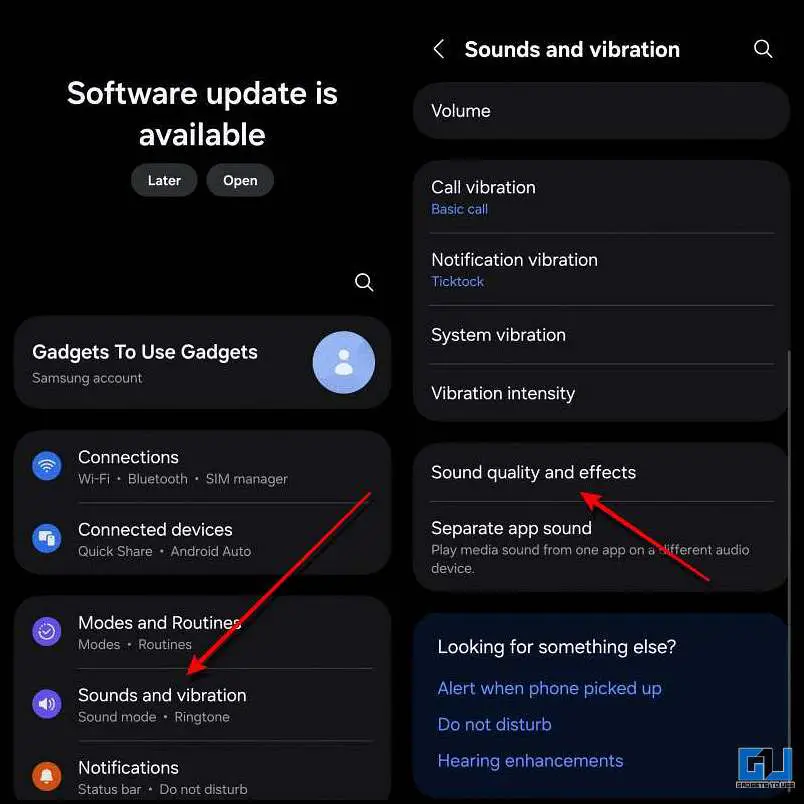
Settings and Sound & vibrations

2. Now select Sound Quality and effects and turn on Dolby Atmos.
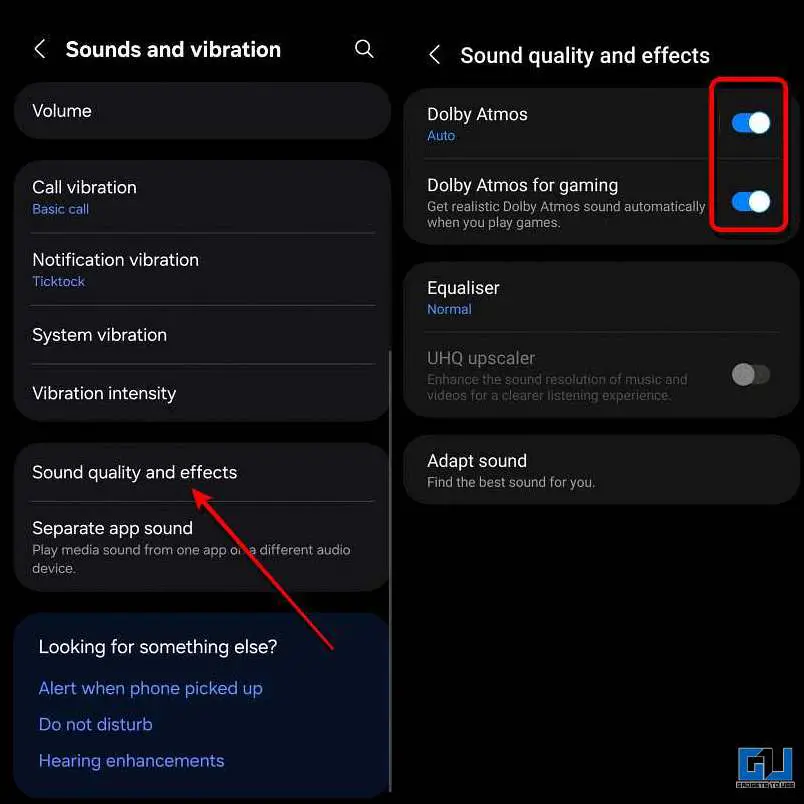
Turn on Dolby atmos

If you are into gaming and want better audio output during your gaming session, then you may also turn on Dolby Atmos for gaming.

Improve Speaker Sound in Samsung Phones

Samsung phones come with a built-in equaliser, which can enhance the sound output of your device. Not every Samsung phone is the same; hence, the speakers need to be tuned to best suit your needs. This can be done by toggling a few settings. Here’s how you can do it:

1. Open Settings and go to Sounds & Vibration.

Settings and Sound & vibrations

2. Now tap on Sound Quality and effect, and open Equaliser.
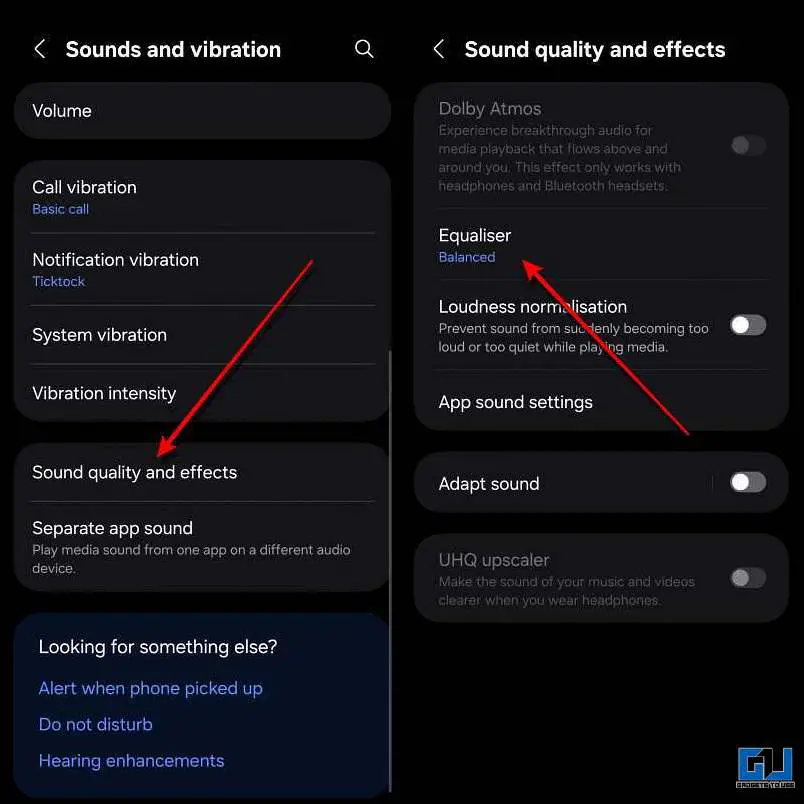
Sound and Vibration &  EQ

3. Now select the Custom option and tune the equaliser. Here’s a reference for a balanced sound output.
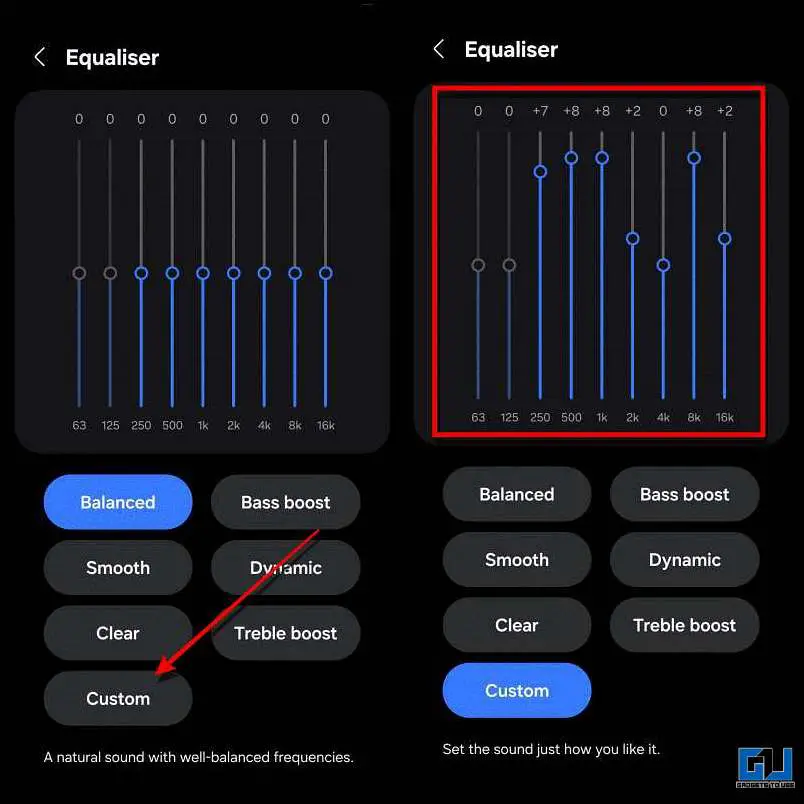
EQ & customs

Changing the equaliser settings will tweak the sound output to suit your taste. However, if the speaker of your device is weak, the difference may not be significant. In such cases, it is recommended to clean the speaker grill of your device carefully.

FAQs

Q. Do Samsung phones support Dolby Atmos in gaming?

Yes. Samsung phones have a special Dolby Atmos option for gaming. Turning it on gives better sound during gameplay.

Q. Do all Samsung phones have an equaliser?

All Samsung phones come with a built-in equaliser. This includes premium models like S-series, Note-series, Z-series, along with mid-range A-series devices.

Wrapping Up

Improving speaker sound on a Samsung phone is very easy and does not take much time. You don’t need any app or extra tools; just a few built-in settings can make a clear difference. If your phone’s sound feels low or unclear, try these steps once. Small changes like enabling Dolby Atmos and adjusting the equalizer can make your music, videos, and games sound much better.

Have any questions related to our how-to guides, or anything in the world of technology? Check out our new GadgetsToUse AI Chatbot for free, powered by ChatGPT.

You can also follow us for instant tech news at Google News or for tips and tricks, smartphones & gadgets reviews, join the GadgetsToUse Telegram Group, or subscribe to the GadgetsToUse Youtube Channel for the latest review videos.

Was this article helpful?

YesNo


Source link

phone Samsung Sound Speakers trick
Share. Facebook Twitter Pinterest LinkedIn Tumblr Email
Previous ArticleRugged routers that sip power for challenging environments
Next Article 5 Valentine’s Day Emails That Don’t Make People Cringe and Still Conve…
Editor-In-Chief
  • Website

Related Posts

Gadgets

Two years of the NordVPN Complete plan is 70 percent off

February 13, 2026
Gadgets

Show Your Furry Valentine Some Love With Gifts From Petcube at 45% Off

February 12, 2026
Gadgets

How to Create Drone Shot Video Using Your Photo

February 11, 2026
Add A Comment
Leave A Reply Cancel Reply

Top Posts

New IPA president Karen Martin delivers rousing call to creative actio…

April 1, 2025130 Views

100+ TikTok Statistics Updated for December 2024

December 4, 2024118 Views

How to Fix Cant Sign in Apple Account, Verification Code Not Received …

February 11, 202595 Views
Stay In Touch
  • Facebook
  • YouTube
  • TikTok
  • WhatsApp
  • Twitter
  • Instagram
Latest Reviews

Subscribe to Updates

Get the latest tech news from thelinkx.com about tech, gadgets and trendings.

Please enable JavaScript in your browser to complete this form.
Loading
About Us

Welcome to TheLinkX – your trusted source for everything tech and gadgets! We’re passionate about exploring the latest innovations, diving deep into emerging trends, and helping you find the best tech products to suit your needs. Our mission is simple: to make technology accessible, engaging, and inspiring for everyone, from tech enthusiasts to casual users.

Our Picks

Two years of the NordVPN Complete plan is 70 percent off

February 13, 2026

Hybrid satellite IoT networks outperform terrestrial deployments

February 13, 2026

OpenAI removes access to sycophancy-prone GPT-4o model

February 13, 2026

Subscribe to Updates

Get the latest tech news from thelinkx.com about tech, gadgets and trendings.

Please enable JavaScript in your browser to complete this form.
Loading
  • About Us
  • Contact Us
  • Disclaimer
  • Privacy Policy
  • Terms and Conditions
© 2026 Thelinkx.All Rights Reserved Designed by Prince Ayaan

Type above and press Enter to search. Press Esc to cancel.