Close Menu
The LinkxThe Linkx
  • Home
  • Technology
    • Gadgets
    • IoT
    • Mobile
    • Nanotechnology
    • Green Technology
  • Trending
  • Advertising
  • Social Media
    • Branding
    • Email Marketing
    • Video Marketing
  • Shop

Subscribe to Updates

Get the latest tech news from thelinkx.com about tech, gadgets and trendings.

Please enable JavaScript in your browser to complete this form.
Loading
What's Hot

22 Tips to Make Your Instagram Reels Popular in 2023

May 2, 2026

Poll: 1 in 5 Canadians more likely to buy an EV because of new rebate …

May 2, 2026

The federated computing platform that keeps your data secure Internet …

May 2, 2026
Facebook X (Twitter) Instagram
Facebook X (Twitter) Instagram Pinterest Vimeo
The LinkxThe Linkx
  • Home
  • Technology
    • Gadgets
    • IoT
    • Mobile
    • Nanotechnology
    • Green Technology
  • Trending
  • Advertising
  • Social Media
    • Branding
    • Email Marketing
    • Video Marketing
  • Shop
The LinkxThe Linkx
Home»Gadgets»How to Enable Vertical Tabs on Google Chrome
Gadgets

How to Enable Vertical Tabs on Google Chrome

Editor-In-ChiefBy Editor-In-ChiefApril 28, 2026No Comments4 Mins Read
Share Facebook Twitter Pinterest LinkedIn Tumblr Reddit Telegram Email
How to Enable Vertical Tabs on Google Chrome
Share
Facebook Twitter LinkedIn Pinterest Email


  • Chrome Flags is a set of experimental features that you can use to customise your Google Chrome experience.
  • Yes, you can either switch back the Tab strip position to ‘Top’ or completely disable the feature through chrome.
  • Vertical Tabs make your Google Chrome experience better specially if you’re someone who has a lot of tabs open at the same time.

Managing multiple tabs in Google Chrome can become a hassle. Especially when there are so many tabs open that you can just see the icons of the websites. The default horizontal layout of the tabs is fine for casual browsing. But it can feel cluttered, especially when you have to switch tabs back and forth. You can manage your tabs better by using a vertical layout for the tabs.
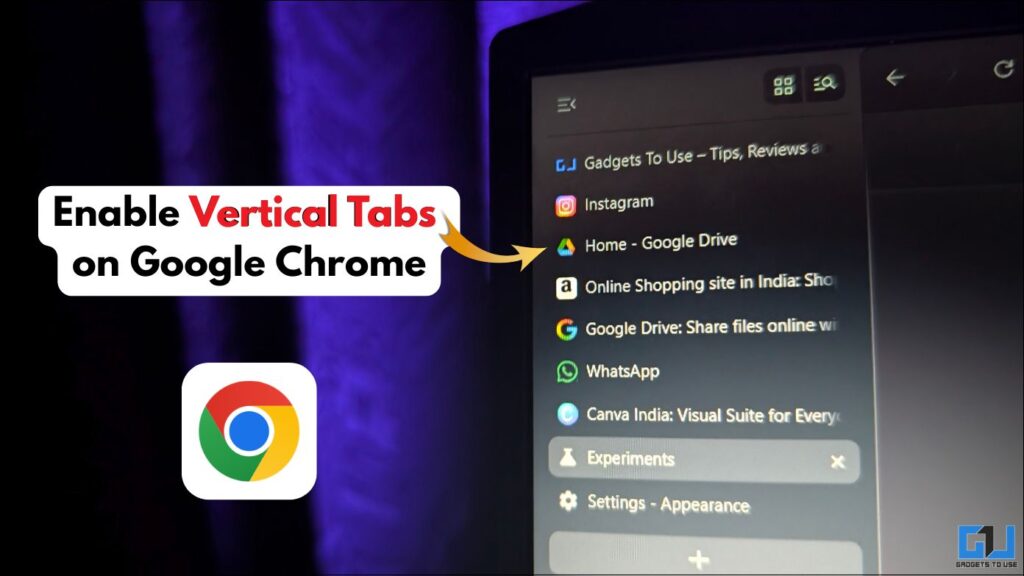
Enable Vertical Tabs on Google Chrome featured

Chrome Flags: Hidden Features on Google Chrome

Chrome Flags is a set of experimental features that you can use to customise your Google Chrome experience. They are not available by default in the stable version of Google Chrome. These are features that you can test for yourself before they get officially introduced to the stable version. One of these features is the Vertical Tabs feature, which you can enable to manage your tabs better.

Enabling Vertical Tabs on Google Chrome Using Chrome Flags

1. Open a new tab on the Chrome Browser. Copy “chrome://flags” and paste it in the search bar. Hit Enter.
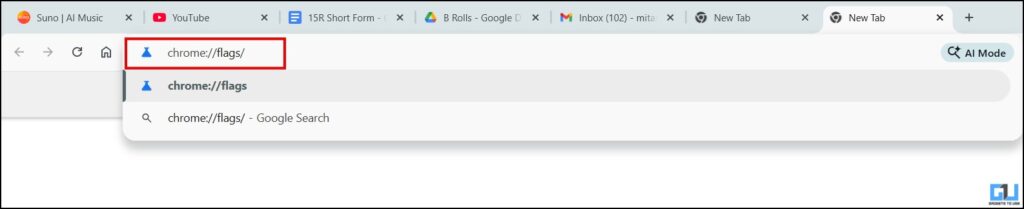
search for chrome flags

2. Here, you would find tons of experimental features in Chrome. In the search bar, search for ‘vertical tabs’.

search for vertical tabs

3. Once you locate it, click on the drop-down menu. Here, select ‘Enabled’.
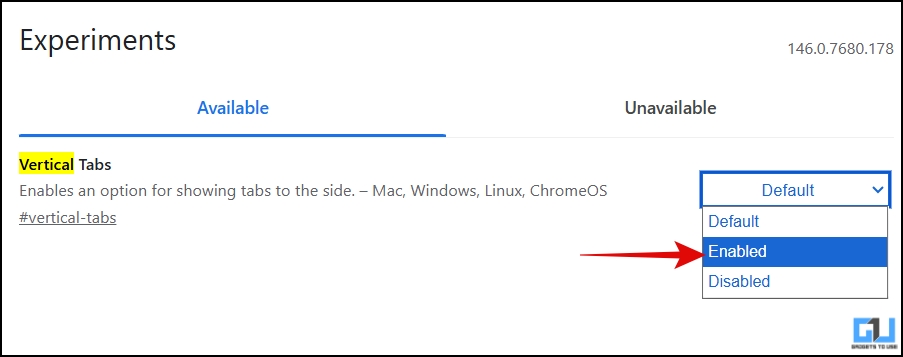
enable vertical tabs

4. Now, you would be prompted to relaunch the browser as changes take effect the next time you open the browser. Click on ‘Relaunch’.

relaunch browser

5. After launching the browser, go to the browser settings or simply copy and paste “chrome://settings” in the search bar.

open settings

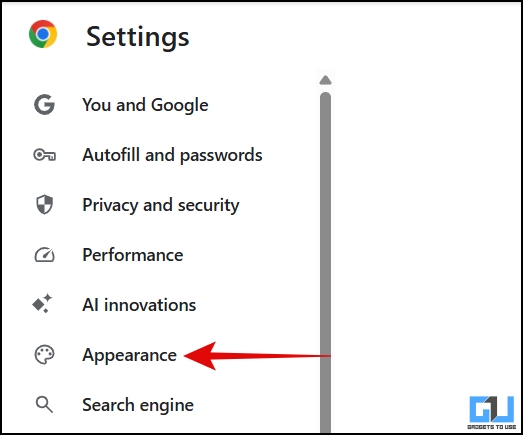
6. Click on the ‘Appearance’ tab.

appearance tab

7. In the ‘Tab strip position’ drop-down menu, select ‘Side’.
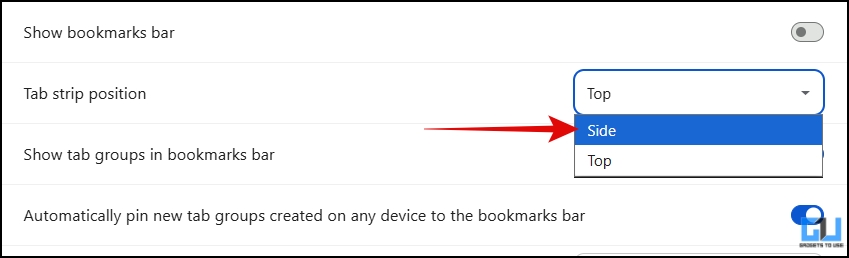
select tab strip position

All the tabs will be shifted to the left side, stacked on top of each other.
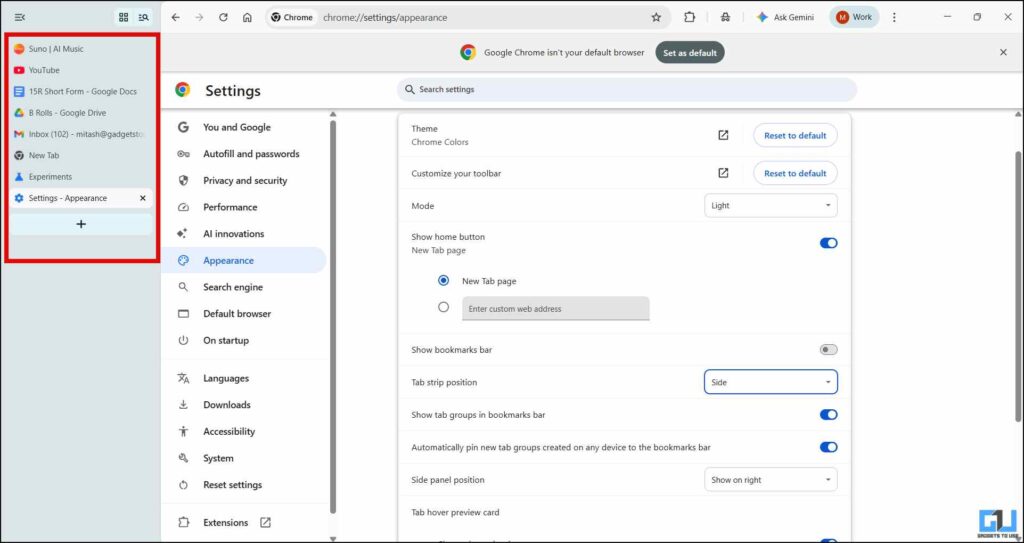
vertical tabs enabled

You can switch back to horizontal tabs by switching the Tab strip position to ‘Top’. Also note that this would work on any Chromium-based browser, such as Brave and Microsoft Edge.

FAQs

Q. Is it safe to use Chrome Flags?

Yes, they are safe to use, but since the features are experimental, they might be unstable or removed without notice.

Q. Can I disable Vertical Tabs if I don’t need them?

Yes, you can either switch back the Tab strip position to ‘Top’ or completely disable the feature through chrome://flags. Select ‘Default’ in Vertical Tabs and relaunch the browser.

Wrapping Up

Vertical Tabs make your Google Chrome experience better specially if you’re someone who has a lot of tabs open at the same time. Since they get stacked on top of each other, you can read the title of the tabs easily. Meanwhile, you can explore other experimental features too in Chrome Flags. However, keep in mind that these features are in the beta phase and can be unstable.

You may also like to read:

Have any questions related to our how-to guides, or anything in the world of technology? Check out our new GadgetsToUse AI Chatbot for free, powered by ChatGPT.

You can also follow us for instant tech news at Google News or for tips and tricks, smartphones & gadgets reviews, join the GadgetsToUse Telegram Group, or subscribe to the GadgetsToUse Youtube Channel for the latest review videos.

⬇️ GadgetsToUse Site Search ⬇️


You can find anything on our website, inlcuding tech how to, solution or reviews using google site search box below.

Was this article helpful?

YesNo


Source link

Chrome Enable Google Google Chrome tabs Vertical
Share. Facebook Twitter Pinterest LinkedIn Tumblr Email
Previous ArticleLive monitoring helps Scottish Water avoid over-pumping at St Andrews …
Next Article Publicis gets Santander moving with Ant and Dec still on board
Editor-In-Chief
  • Website

Related Posts

Gadgets

22 Tips to Make Your Instagram Reels Popular in 2023

May 2, 2026
Gadgets

How to know if your old Roku is expired

May 1, 2026
Gadgets

‘Macross Plus’ Is an Ultra-Romantic Classic That Refuses to Age

April 30, 2026
Add A Comment
Leave A Reply Cancel Reply

Top Posts

New IPA president Karen Martin delivers rousing call to creative actio…

April 1, 2025163 Views

100+ TikTok Statistics Updated for December 2024

December 4, 2024137 Views

How to Fix Cant Sign in Apple Account, Verification Code Not Received …

February 11, 2025111 Views
Stay In Touch
  • Facebook
  • YouTube
  • TikTok
  • WhatsApp
  • Twitter
  • Instagram
Latest Reviews

Subscribe to Updates

Get the latest tech news from thelinkx.com about tech, gadgets and trendings.

Please enable JavaScript in your browser to complete this form.
Loading
About Us

Welcome to TheLinkX – your trusted source for everything tech and gadgets! We’re passionate about exploring the latest innovations, diving deep into emerging trends, and helping you find the best tech products to suit your needs. Our mission is simple: to make technology accessible, engaging, and inspiring for everyone, from tech enthusiasts to casual users.

Our Picks

22 Tips to Make Your Instagram Reels Popular in 2023

May 2, 2026

Poll: 1 in 5 Canadians more likely to buy an EV because of new rebate …

May 2, 2026

The federated computing platform that keeps your data secure Internet …

May 2, 2026

Subscribe to Updates

Get the latest tech news from thelinkx.com about tech, gadgets and trendings.

Please enable JavaScript in your browser to complete this form.
Loading
  • About Us
  • Contact Us
  • Disclaimer
  • Privacy Policy
  • Terms and Conditions
© 2026 Thelinkx.All Rights Reserved Designed by Prince Ayaan

Type above and press Enter to search. Press Esc to cancel.