
Close Menu
The LinkxThe Linkx
  • Home
  • Technology
    • Gadgets
    • IoT
    • Mobile
    • Nanotechnology
    • Green Technology
  • Trending
  • Advertising
  • Social Media
    • Branding
    • Email Marketing
    • Video Marketing
  • Shop

Subscribe to Updates

Get the latest tech news from thelinkx.com about tech, gadgets and trendings.

Please enable JavaScript in your browser to complete this form.
Loading
What's Hot

Amazon Facilities in Bahrain Hit Again as Iran Follows Through on Thre…

April 1, 2026

Why General Motors lobbied against its own EV goals

April 1, 2026

Cisco’s Role in the NIST GenAI Program

April 1, 2026
Facebook X (Twitter) Instagram
Facebook X (Twitter) Instagram Pinterest Vimeo
The LinkxThe Linkx
  • Home
  • Technology
    • Gadgets
    • IoT
    • Mobile
    • Nanotechnology
    • Green Technology
  • Trending
  • Advertising
  • Social Media
    • Branding
    • Email Marketing
    • Video Marketing
  • Shop
The LinkxThe Linkx
Home»Mobile»Google Pixels got 80% battery charge limit and battery bypass with the…
Mobile

Google Pixels got 80% battery charge limit and battery bypass with the…

Editor-In-ChiefBy Editor-In-ChiefDecember 12, 2024No Comments2 Mins Read
Share Facebook Twitter Pinterest LinkedIn Tumblr Reddit Telegram Email
Google Pixels got 80% battery charge limit and battery bypass with the…
Share
Facebook Twitter LinkedIn Pinterest Email


A few days ago Google rolled out the December Pixel Drop with a lengthy post about new Gemini features and more. What it didn’t mention is that Pixels now have an option to limit the battery charge, which caps it at 80% to extend its life. And there’s an extra feature too.

The Google Pixel 8 series and the Pixel 9 series now support bypass “charging” – it powers the phone from an external source (typically a wall adapter, but a good enough power bank should also work) instead of the internal battery. To enable this, you need to toggle the 80% charge limit – then the battery will neither charge nor discharge once it reaches 80%.

If you’ve installed the latest Pixel software, you will find the option in Settings > Battery. Toggle “Use charging optimization” and pick “Limit to 80%” (the other option is the familiar “Adaptive Charging”). This will enable both the charge limit and the bypass.
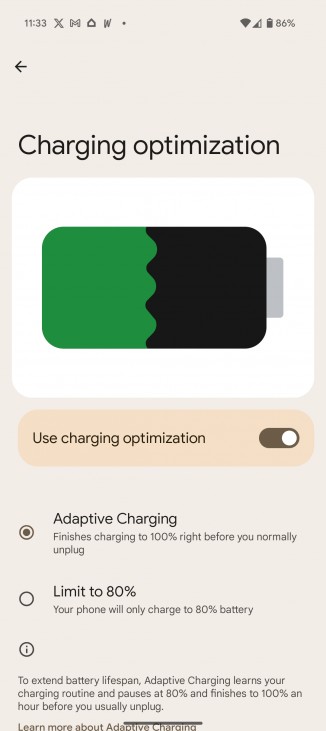
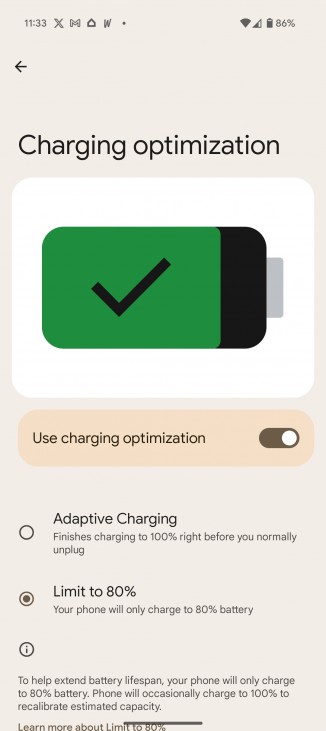
Enabling the battery charge limit and bypass

Enabling the battery charge limit and bypass

To verify that it worked, you can use an app to view the battery status – it should show the battery as “not charging” and the power source as “AC” (as in wall power rather than battery).

Note that the phone will occasionally charge its battery to 100% and let it go down to 80%. All bypass features do this, it’s so that the circuitry can calibrate itself and give accurate battery charge level readings.

Now, since Google snuck this feature in, there’s no official word on charger requirements for bypass to work. The support page is quite terse and doesn’t mention any requirements.

Other brands have implemented a similar feature. Samsung, for example, calls it “Pause USB Power” and it does have requirements: a USB Power Delivery charger with PPS and at least a 25W rating.

Via


Source link

battery bypass charge Google limit Pixels the..
Share. Facebook Twitter Pinterest LinkedIn Tumblr Email
Previous ArticleNovel cocktail therapy based on multifunctional supramolecular hydroge…
Next Article Connecting communities funded by Broadband Equity, Access, and Deploym…
Editor-In-Chief
  • Website

Related Posts

Mobile

Get the Google Pixel 10 at a record-low price and save $250

April 1, 2026
Mobile

Oscar nominee Stellan Skarsgård to star in untitled Apple TV series

March 31, 2026
Mobile

Our favorite Android gaming controller just crashed to $68 during Amaz…

March 30, 2026
Add A Comment
Leave A Reply Cancel Reply

Top Posts

New IPA president Karen Martin delivers rousing call to creative actio…

April 1, 2025153 Views

100+ TikTok Statistics Updated for December 2024

December 4, 2024129 Views

How to Fix Cant Sign in Apple Account, Verification Code Not Received …

February 11, 2025103 Views
Stay In Touch
  • Facebook
  • YouTube
  • TikTok
  • WhatsApp
  • Twitter
  • Instagram
Latest Reviews

Subscribe to Updates

Get the latest tech news from thelinkx.com about tech, gadgets and trendings.

Please enable JavaScript in your browser to complete this form.
Loading
About Us

Welcome to TheLinkX – your trusted source for everything tech and gadgets! We’re passionate about exploring the latest innovations, diving deep into emerging trends, and helping you find the best tech products to suit your needs. Our mission is simple: to make technology accessible, engaging, and inspiring for everyone, from tech enthusiasts to casual users.

Our Picks

Amazon Facilities in Bahrain Hit Again as Iran Follows Through on Thre…

April 1, 2026

Why General Motors lobbied against its own EV goals

April 1, 2026

Cisco’s Role in the NIST GenAI Program

April 1, 2026

Subscribe to Updates

Get the latest tech news from thelinkx.com about tech, gadgets and trendings.

Please enable JavaScript in your browser to complete this form.
Loading
  • About Us
  • Contact Us
  • Disclaimer
  • Privacy Policy
  • Terms and Conditions
© 2026 Thelinkx.All Rights Reserved Designed by Prince Ayaan

Type above and press Enter to search. Press Esc to cancel.