
Close Menu
The LinkxThe Linkx
  • Home
  • Technology
    • Gadgets
    • IoT
    • Mobile
    • Nanotechnology
    • Green Technology
  • Trending
  • Advertising
  • Social Media
    • Branding
    • Email Marketing
    • Video Marketing
  • Shop

Subscribe to Updates

Get the latest tech news from thelinkx.com about tech, gadgets and trendings.

Please enable JavaScript in your browser to complete this form.
Loading
What's Hot

Voice and data services down for many customers

January 14, 2026

Juniper Research releases emerging IoT trends report for 2026 Internet…

January 14, 2026

Apple Picking Google Gemini to Power Siri Was About Buying Time

January 14, 2026
Facebook X (Twitter) Instagram
Facebook X (Twitter) Instagram Pinterest Vimeo
The LinkxThe Linkx
  • Home
  • Technology
    • Gadgets
    • IoT
    • Mobile
    • Nanotechnology
    • Green Technology
  • Trending
  • Advertising
  • Social Media
    • Branding
    • Email Marketing
    • Video Marketing
  • Shop
The LinkxThe Linkx
Home»Mobile»This new Apple Intelligence feature in iOS 26 might be one of my all-t…
Mobile

This new Apple Intelligence feature in iOS 26 might be one of my all-t…

Editor-In-ChiefBy Editor-In-ChiefJanuary 11, 2026No Comments2 Mins Read
Share Facebook Twitter Pinterest LinkedIn Tumblr Reddit Telegram Email
This new Apple Intelligence feature in iOS 26 might be one of my all-t…
Share
Facebook Twitter LinkedIn Pinterest Email


Here are the things I love most about iOS 26 | Stylized iOS 26 graphic with a liquid glass heart

It’s been half a year since iOS 26 debuted in beta, so I’ve had quite a bit of time to sit with it. In a release with such a massive redesign, it’s easy for some of the smaller additional features to fly under the radar – but after giving iOS 26 my fair shot, I’ve come to really like one underlying feature in particular, and it has to do with screenshots.

Screenshots as a whole in iOS 26 received a pretty big visual overhaul, with an all new interface to encompass three new Apple Intelligence features: creating calendar events with screenshots, image search to find web results, and the ability to ask ChatGPT about your screenshot.
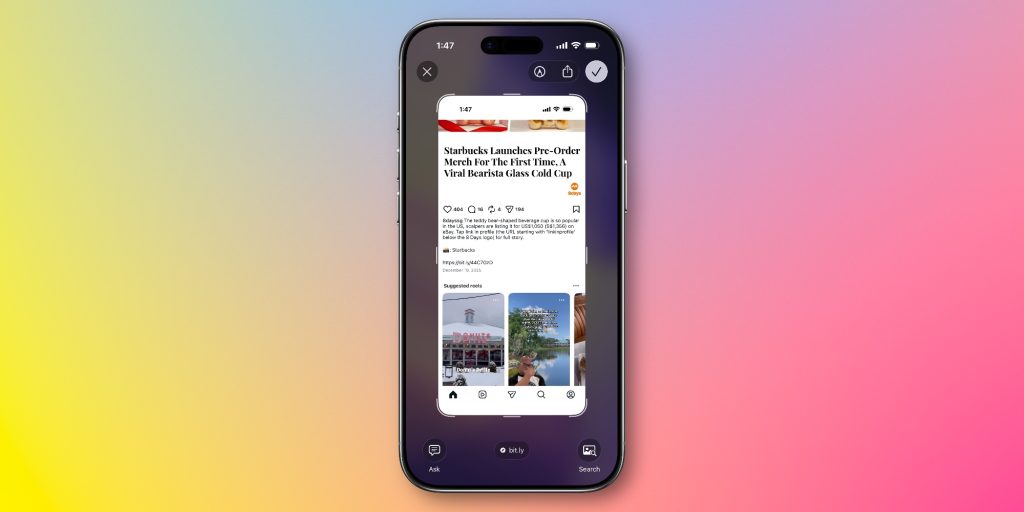
Visual Intelligence for Calendar events

One of the most useful features I’ve found in iOS 26 is the first one: the ability to create a calendar event with a screenshot.

I’ve never been much of a heavy calendar person. I do have my calendar widget on my home screen for when calendar invites are shared with me, but I’ve never really been much of a person to create calendar events for my own sake.

Generally, I preferred relying on Reminders, my to-do app (Todoist), and pure memory. iOS 26 changed that, though.
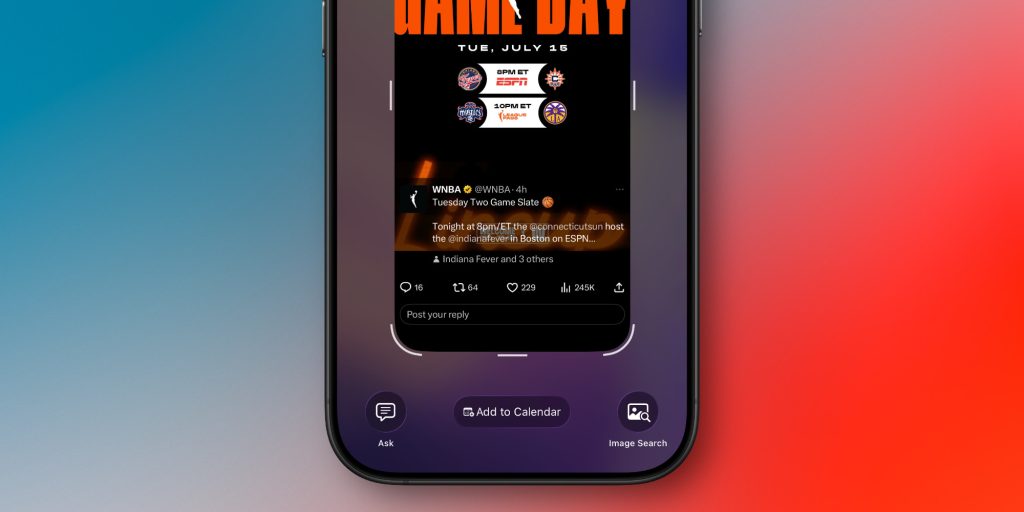
Now that adding something to calendar is as easy as taking a screenshot, I’ve been using calendar for far more. It particularly came in handy during CES, when I had many different events to bounce around.

I’ve also found that this feature works remarkably well. Whether you’re screenshotting an Instagram story, an email, or a website, I’m yet to see it fail to pull out the relevant details and turn it into a calendar event.

All you have to do is take a screenshot and tap the little add to calendar button at the bottom. You’ll read over the details, then you can just add it. It’s really that simple.


My favorite Apple accessory recommendations:

Follow Michael: X/Twitter, Bluesky, Instagram

Add 9to5Mac as a preferred source on Google

FTC: We use income earning auto affiliate links. More.



Source link

allt.. Apple feature Intelligence iOS
Share. Facebook Twitter Pinterest LinkedIn Tumblr Email
Previous ArticleThe best hardware and accessories of CES 2026 for Apple users
Next Article Your Next Drone Might Look Like a Grasshopper
Editor-In-Chief
  • Website

Related Posts

Mobile

Apple Picking Google Gemini to Power Siri Was About Buying Time

January 14, 2026
Mobile

Ultrahuman launches features 15% faster with Gemini in Android Studio

January 13, 2026
Mobile

Google Home just made its automations a lot more powerful

January 12, 2026
Add A Comment
Leave A Reply Cancel Reply

Top Posts

New IPA president Karen Martin delivers rousing call to creative actio…

April 1, 2025124 Views

100+ TikTok Statistics Updated for December 2024

December 4, 2024116 Views

How to Fix Cant Sign in Apple Account, Verification Code Not Received …

February 11, 202586 Views
Stay In Touch
  • Facebook
  • YouTube
  • TikTok
  • WhatsApp
  • Twitter
  • Instagram
Latest Reviews

Subscribe to Updates

Get the latest tech news from thelinkx.com about tech, gadgets and trendings.

Please enable JavaScript in your browser to complete this form.
Loading
About Us

Welcome to TheLinkX – your trusted source for everything tech and gadgets! We’re passionate about exploring the latest innovations, diving deep into emerging trends, and helping you find the best tech products to suit your needs. Our mission is simple: to make technology accessible, engaging, and inspiring for everyone, from tech enthusiasts to casual users.

Our Picks

Voice and data services down for many customers

January 14, 2026

Juniper Research releases emerging IoT trends report for 2026 Internet…

January 14, 2026

Apple Picking Google Gemini to Power Siri Was About Buying Time

January 14, 2026

Subscribe to Updates

Get the latest tech news from thelinkx.com about tech, gadgets and trendings.

Please enable JavaScript in your browser to complete this form.
Loading
  • About Us
  • Contact Us
  • Disclaimer
  • Privacy Policy
  • Terms and Conditions
© 2026 Thelinkx.All Rights Reserved Designed by Prince Ayaan

Type above and press Enter to search. Press Esc to cancel.
